20
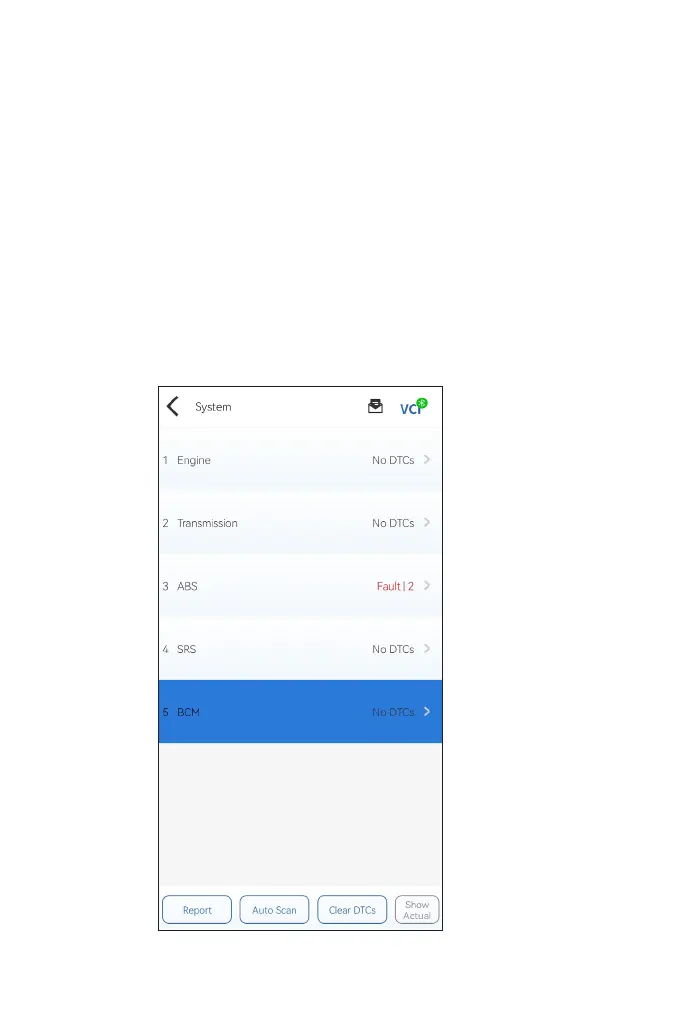
You can either select Auto Scan or tap a vehicle system to open
the function menu for that system.
Figure 4-6
Auto Scan
Auto Scan detects the systems supported by the vehicle and
retrieves DTCs for all of these systems, providing a complete health
check of your vehicle. Performing Auto Scan before and after repair
could help in troubleshooting and validating repairs. Pre and post
scan reports can allow you to record the condition of the vehicle
before and after repair for comparison.
To perform an Auto Scan, tap the Auto Scan button. The
TopScan will start scanning all the systems supported by the
vehicle, and DTC retrieval will be automatically proceeded.
Results are displayed progressively as the systems are scanned.


 To Next Page