38
USING
EN EN
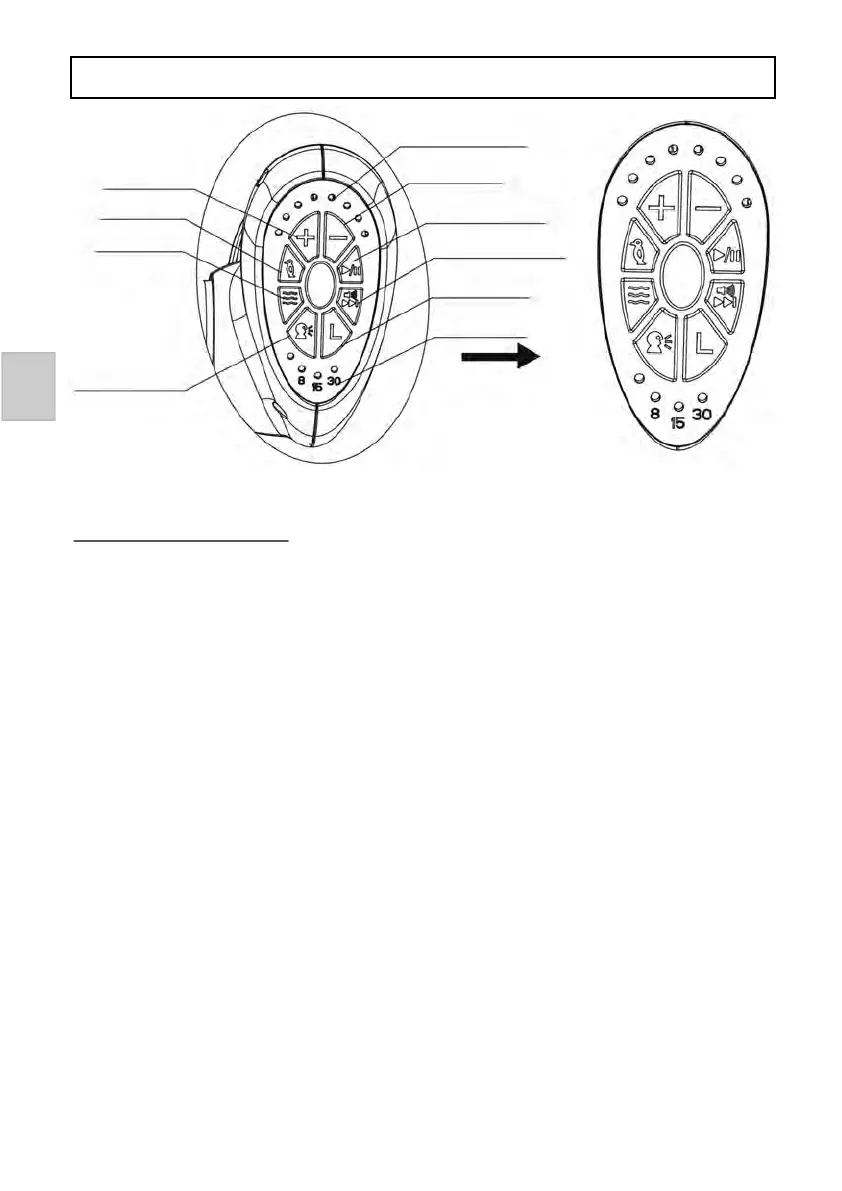
Funcons control panel:
1. Speed adjust buon: There are 8 types of swing speed( 8 indicator lamps).
Press “+” for speed up, “-” for speed down(as above picture shows).
2. Timer: There are three types of me seng. Press the mer buon once, the
light will be on for 8 minutes. Press it a second me, the light will be on for
15 minutes.
Press it a third me, the light will be on for 30 minutes. When seng me is reached,
all funcons will stop. If me seng funcon is not used, all funcon will start
working unl power is turned o.
3. Play/pause buon: Press the buon once to start playing music. Press it
second me to stop playing music.
4. Volume/next song buon: Aer pressing music play buon, press this buon
to play next song (the swing has 12 melodies). Press “volume/next song” buon
for a while to adjust volume. Aer seng the volume, release the buon.
5. Bird and water sound buon: Press “bird sound” buon for bird sound, press
it again to stop. Press “water sound” buon for water sound, press it again to
stop. (Noce that when playing bird and water sound, pressing the “play/pause”
buon can also stop the sound).
6. Voice control detecon: When you press the voice control detecon
buon the indicator light will be on. Press any buon to quit this mode.
If voice control detecon sensor connually receives two or more sounds,
the machine will start working. It will swing in lowest speed and play music
on middle volume.
1.Indicator lamp
1. Speed down
3. Music play and pause
4. Volume/ next song
buon
2. Timer buon
2. Timer indicator lamp
1. Speed up
5. Bird sound
5. Water sound
6. Moon detecon


 To Next Page