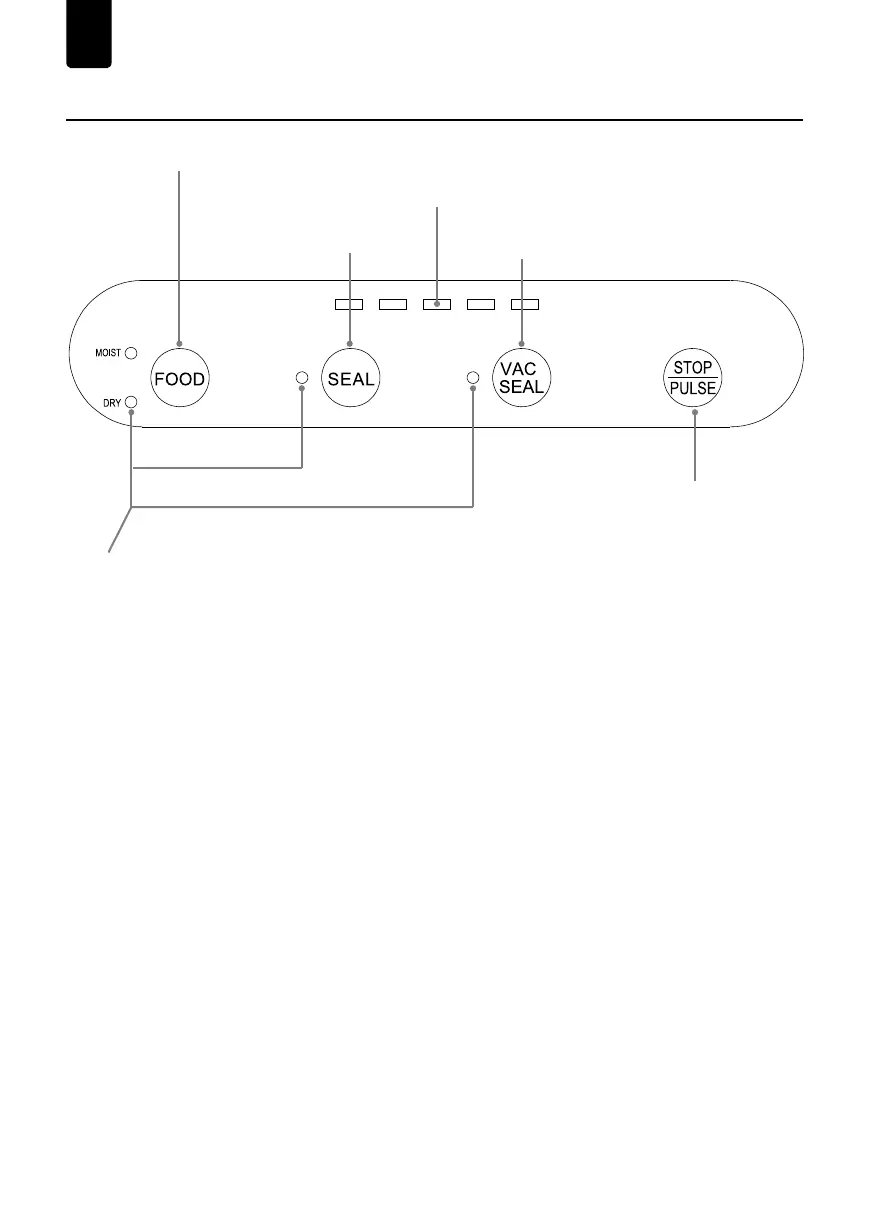
③ VAC& SEAL BUTTON
②
SEAL BUTTON
④
STOP AND PULSE VACUUM BUTTON
① DRY/ MOIST FOOD SETTING BUTTON
INDICATOR LIGHTS
⑤
It will take longer time to seal moist food than dry food.
The indicator light will be illuminated when the corresponding function selected.
Close the cover, press it to vacuum the bag and seal it. (Wait for 60s between uses to allow
appliance to cool down)
During any working status, press STOP button to stop current processing immediately.
In the standby mode, press and hold the PULSE/STOP button to activate the function, when it
starts to PULSE vacuum, the operator can control the vacuum pressure manually by this button
according to different food. After achieving the desired vacuum effect, release the button and
choose SEAL to seal the bag.
The indicator light will be illuminated when VAC / VAC SEAL / SEAL working.
Close the cover, press the SEAL button if you only want to seal the bag. (Wait for 60s
between seals to allow appliance to cool down)
If several lights flasing at the same time after continuous working, overheating protection
activated. Please wait for 5-10 minutes for cooling down and the appliance will be back in
normal mode.
Note:
FUNCTIONS — VS6611
EN
①
DRY/MOIST FOOD SETTING BUTTON
⑤
INDICATOR LIGHTS
②
SEAL BUTTON
③
VAC & SEAL BUTTON
④
STOP AND PULSE
VACUUM BUTTON
- 02 -


 To Next Page
 Loading...