This document describes a portable speaker, model TT810BT, designed for versatile audio playback. It supports multiple input sources and offers various features for an enhanced user experience.
Function Description:
The device functions as a portable audio player with several input options. It can play MP3 format files from SD/MMC cards and USB drives. It also features an FM radio tuner with a frequency range of 87.5-108 MHz. An AUX input (LINE IN) allows connection to external music sources such as mobile phones, MP3/MP4 players, and PCs. For karaoke enthusiasts, the device includes a "Kalaoke Function" with a MIC input. The speaker is rechargeable via a DC 5.0V adapter.
Important Technical Specifications:
- Speaker Power: 10W, 5-inch speaker
- Battery: Lithium battery 3.7V, 1800mAh
- Dimensions: 220x210x340mm
- Output: 10W
- Frequency Response: 150Hz-18kHz
- SNR (Signal-to-Noise Ratio): ≥80dB
- Loudspeaker: 5 inch (external diameter 127mm), magnetic resistant 2 Ohms
- Power Supply: DC 5V USB
- FM Frequency Range: 87.5-108 MHz
- Supported Audio Format: MP3 (from SD/MMC Card, U disk)
Usage Features:
The device offers intuitive controls for playback and mode selection.
- Power/Charging: Connect the DC 5.0V adapter to the charging port on the back of the speaker to charge the device.
- Mode Selection: The "MODE" button allows switching between U disk, SD/MMC, FM, and AUX input modes. The device automatically recognizes memory cards and USB drives without requiring manual switching.
- Navigation and Volume Control:
- "PREV/VOL-" (Backward/Volume down): A short press goes to the previous track/station. A long press decreases the volume. In FM mode, a short press selects the previous channel.
- "NEXT/VOL+" (Forward/Volume up): A short press goes to the next track/station. A long press increases the volume. In FM mode, a short press selects the next channel.
- "PLAY/PAUSE": A short press plays or pauses the current track. In FM mode, a short press initiates auto-scanning and saving of radio stations.
- Equalizer (EQ) Modes: The "EQ" button allows selection of different audio modes to suit various music genres, including Natural, Rock, Pop, Classical, Light, Jazz, and Subwoofer.
- Remote Control Features:
- "CH" button (Remote Control): In FM mode, this button initiates auto-scanning and saving of radio stations.
- "Digital" button (Remote Control): In MP3 mode, this button allows selecting specific music tracks. In FM mode, it allows selecting channels.
- Karaoke Function: To use the karaoke feature, connect a microphone to the "MIC" input.
- External Audio Input: Connect a 3.5mm stereo audio cable to the "LINE IN (AUX)" port to play music from external devices.
Maintenance Features:
The manual does not explicitly detail maintenance features. However, general care for electronic devices would apply:
- Keep the device away from water and extreme temperatures.
- Clean the device with a soft, dry cloth.
- Ensure proper charging to prolong battery life.
FCC Compliance:
The device complies with Part 15 of the FCC Rules, ensuring it meets standards for electromagnetic interference.
- It is designed to provide reasonable protection against harmful interference in residential installations.
- Users are advised to reorient or relocate the receiving antenna, increase separation between equipment and receiver, or connect the equipment to a different circuit if interference occurs.
- Any changes or modifications not expressly approved by the responsible party could void the user's authority to operate the equipment.
- Shielded interface cables should be used when connecting to computers or peripheral devices to maintain compliance.
- The device is evaluated to meet general RF exposure requirements and can be used in portable exposure conditions without restriction.

 Need help?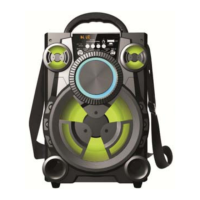

 To Next Page
 General