EasyManua.ls Logo

TOPVISION JQ818B - Page 17

TOPVISION JQ818B
24 pages
Print Icon
To Next Page IconTo Next Page
To Previous Page IconTo Previous Page
Loading...
3.When
successfully
paired,
it
will
show
"
Bluetooth
Connected"
on
the
menu.
Exit
the
menu,
the
sound
will
come
out
from
the
Bluetooth
speaker.
4.
It
can
connect
the
last
Bluetooth
speaker
automatically
when
the
unit
is
powered
on
again
Note:
It
needs
power
on
the
last
connected
Bluetooth
speaker
first,
then
turned
on
the
projector.
if it
can't
connect
last
devices
automatically,
please
repeat
steps
2~3.
After
the
initial
pairing,
the
projector
and
the
Bluetooth
speakers
will
stay
paired
unless
unpaired
manually
by
the
user,
or
erased
due
to
a
reset
of
either
device.
I
this
occurs,
or
you
find
either
unit
is
unable
to
connect,
repeat
the
above
steps.
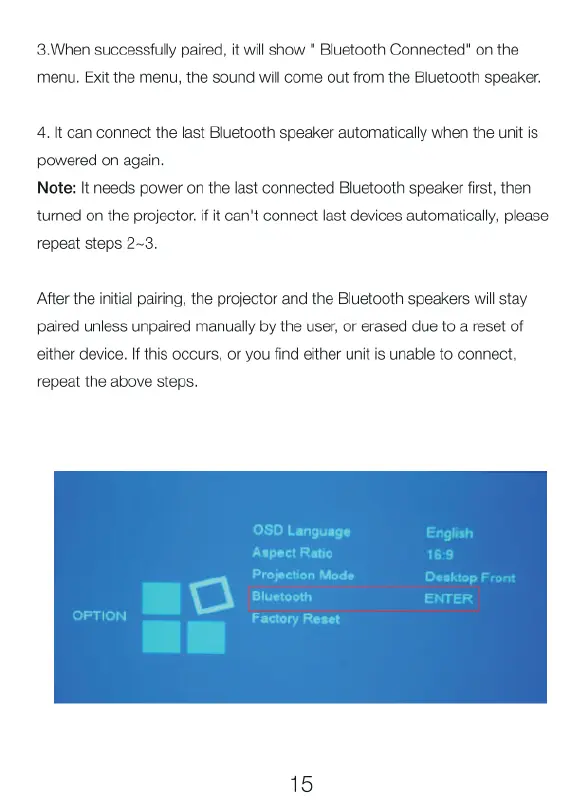
OSD
Language
English
Aspect
Ratio
16:9
Projection
Mode
Desktop
Bluetooth
EN
OPTION
Factory
Reset
15