– 7 –
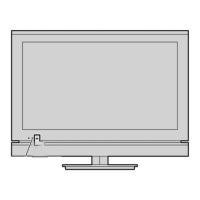
4 p / o (on-screen information or input
source) — This button switches to the
on-screen information or the input source
selection.
* USB (FOR SERVICE USE ONLY) —Terminal for
service use only. Not used normally.
Learning about the remote control
9
8
1
11
13
15
2
17
19
6
20
22
24
10
12
14
16
4
18
3
5
21
23
7
1 Power on/standby — Press to turn the TV on/
standby.
2 Programme position — When no menu is on
screen, these buttons select the programme
position.
3 MENU up/down — When a menu is on-screen,
these buttons function as up/down menu
navigation buttons.
MENU left/right — When a menu is on-screen,
these buttons function as left/right menu
navigation buttons or adjust settings.
OK — To con rm your selection.
4 Volume — These buttons adjust the volume
level.
5 On-screen Menus
6 To return to the previous menu
7 Input source selection
8 Picture Size
9 TEXT Subtitle pages if available
10 Picture still
11 Stereo/Bilingual selection
12 Number buttons (0-9)
13 To display the Channel List
14 To return to the previous programme
15 To display on-screen information
Initial/Index function for Teletext
16 This button turns the sound o /on
17 To exit menu
18 To access the Quick Menu
19 Teletext on/Superimpose Teletext/o
20 Teletext control buttons (Four coloured buttons:
Red, Green, Yellow, Blue)
21 To reveal concealed text
22 To select a page while viewing a normal picture
To select the time display
23 To hold a wanted page
24 To enlarge the teletext display size
TV back panel connections
L/
MONO
AUDIO
VIDEO
R
VCR (Normal)
DVD video player
(with standard
video outputs)
Set Top Box
or
or
TV back view
HDMI device
VIDEO AUDIO
LR
IN
OUT
HDMIOUT
Cable holder *
* You can use the cable holder to hold the aerial
cable, video and audio cables etc.
Never grasp the holder when moving the TV.
Connection example
Cable holder *
242932P1300SeriesEn.indd7242932P1300SeriesEn.indd7 2013/04/0810:07:032013/04/0810:07:03


 To Next Page
 Loading...