15
EN
Introduction Connections Basic Setup Playback
Editing
Others
Function Setup
Recording
Guide to On-Screen Displays
DISPLAY Menu
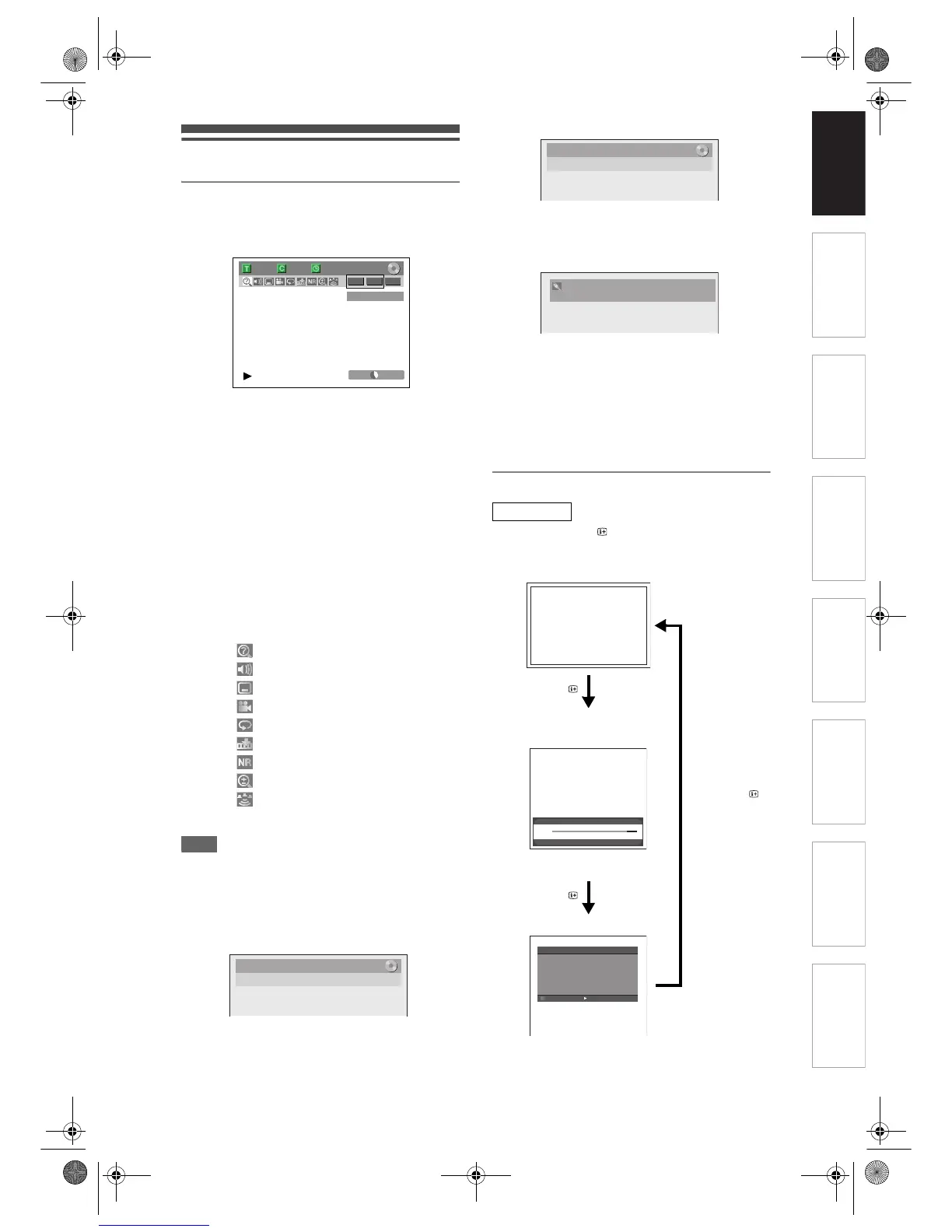
With a disc inserted into the unit, press [DISPLAY] to
display the On-Screen Display. The menu shows
information about what is recorded on the disc.
This is an example screen for explanation. Displayed
items vary depending on the actual mode.
1 Indicates a disc type and format mode.
2 Indicates a type of titles for VR mode
DVD-RW disc.
3 Indicates a channel number or selected
external input mode.
4 Indicates a recording mode and possible
recording time left.
5 Indicates a title number, chapter number,
elapsed time and total of disc playback.
6 Each icon means:
7 Indicates an operation status.
Note
• In some descriptions on this manual, only one disc
type is indicated as an example.
Press [DISPLAY] while the On-Screen Display is
displayed to display Title Name Information, File
Name Information or HDMI Information.
<Title Name Information>
(only when DVD+RW/+R, VR mode DVD-RW/-R,
or unfinalised Video mode DVD-RW/-R disc is in
playback)
<File Name Information>
(only when a CD with MP3/JPEG/DivX
®
files is in
playback)
1 Displays title/file name.
<HDMI Information>
(only for the images output through the HDMI
output)
1 Indicates the resolution of the HDMI
output image.
2 Indicates the HDMI video format.
3 Indicates the HDMI audio format.
• “- - -” will be displayed, when it does not have any
information.
INFO Menu
Pressing the [INFO ] while you are viewing DVB
channels to display the programme information.
1/ 5 1/ 5
-
RW VR ORG
0:01:00 / 1:23:45
SP 1:53
22
55
66 11
3
7
4
901
: Search
: Audio
: Subtitle
: Angle
: Repeat
: Marker
: Noise Reduction
: Zoom
: Surround
Title Name
My Title
1
1
22
33
Now: 00:00 KIDS KITCHEN
Next: 01:00 Fish
18 : CTV1 00:26
Multi-Audio Subtitles MHEG 16:9 For info press [INFO]
<OFF>
<CHANNEL NUMBER and NAME/
Current and Next programme
name/programme start time>
After 3 seconds, the window will be
back to the previous screen.
Press [INFO ]
EPG
Channel: CHILDREN
Open time: 00:00-01:00
KIDS KITCHEN
It is a cooking competition of under twelve-year-old
children. They should cook vegetable, meat or fish.
Even then never seen before. Winner will be a chef
at famous restaurant in London for one day.
Timer
Next
<EPG Programme Detail menu>
Press [INFO ],
[RETURN/BACK]
or [SETUP]
Press [INFO ]
E7J70BD_EN.book Page 15 Monday, May 7, 2007 3:31 PM



 To Next Page
 Loading...