5 VARIOUS FUNCTIONS
124 User Functions Menu List
SCAN
LIST
ADDRESS BOOK
* Available only for e-STUDIO2505F.
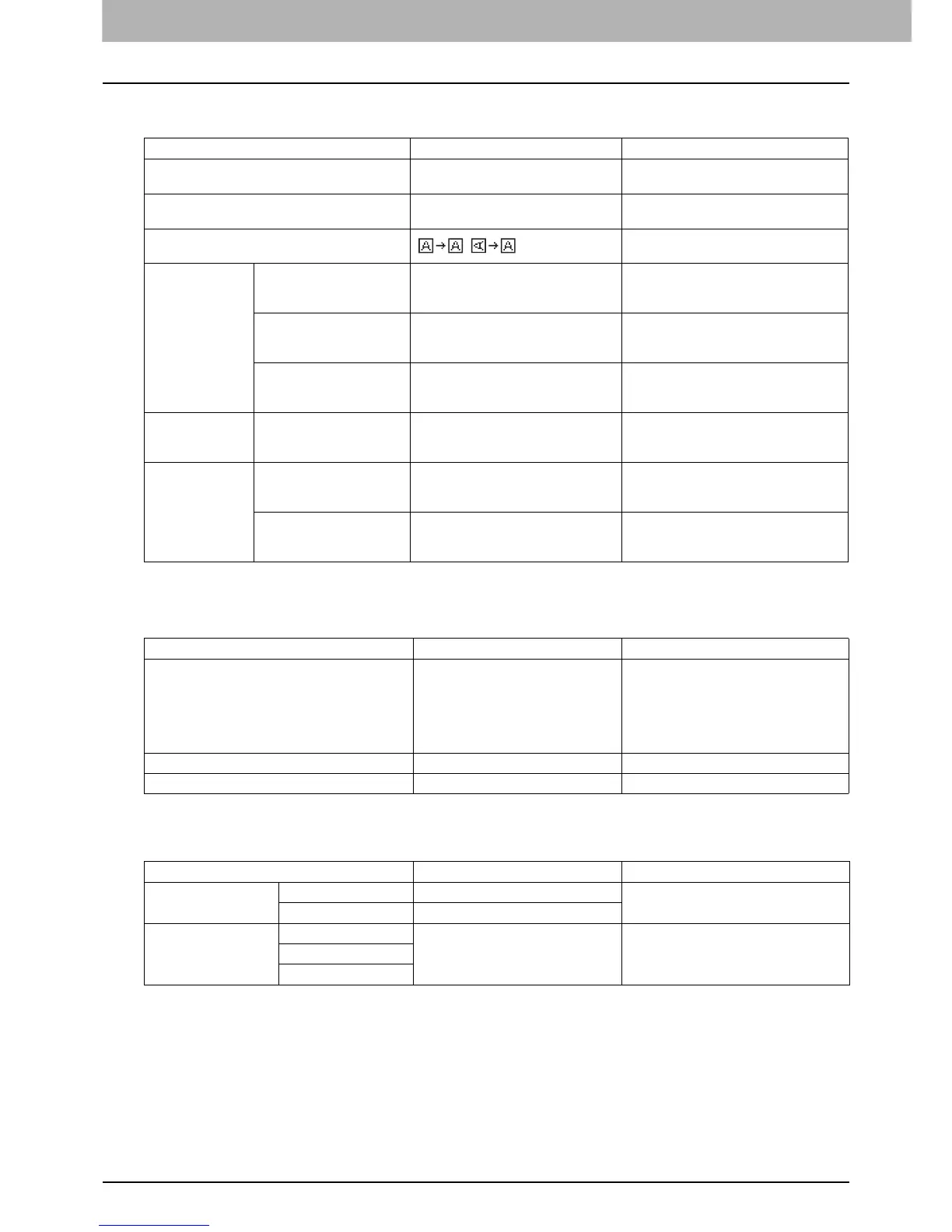
Menu Functions Settings Description
COLOR MODE BLACK, GRAY SCALE, FULL COLOR Sets the default setting for the color
mode.
COMPRESS LOW, MID, HIGH Sets the default setting for the
compression ratio.
ROTATION
Sets the default setting for the orientation.
BLACK SETTING RESOLUTION 600dpi, 300dpi, 150dpi Sets the default setting for the resolution
when [BLACK] is selected for the color
mode setting.
ORIGINAL MODE TEXT/PHOTO, TEXT, PHOTO Sets the default setting for the original
mode when [BLACK] is selected for the
color mode setting.
EXPOSURE AUTO, Manual Sets the default setting for the density
when [BLACK] is selected for the color
mode setting.
GRAY SETTING RESOLUTION 600dpi, 300dpi, 150dpi Sets the default setting for the resolution
when [GRAY SCALE] is selected for the
color mode setting.
FULL COLOR
SETTING
RESOLUTION 600dpi, 300dpi, 150dpi Sets the default setting for the resolution
when [FULL COLOR] is selected for the
color mode setting.
ORIGINAL MODE TEXT/PHOTO, TEXT, PHOTO Sets the default setting for the original
mode when [FULL COLOR] is selected
for the color mode setting.
Menu Functions Settings Description
ADDRESS BOOK e-STUDIO2505H:
SINGLE NUMBER, GROUP
NUMBER
e-STUDIO2505F:
SPEED DIAL, GROUP DIAL, ONE
TOUCH
Prints the E-mail address list.
For details of the fax settings, see the
Fax Guide.
FUNCTION - Prints the user function list.
COUNTER - Prints the total counter list.
Menu Functions Settings Description
E-MAIL SINGLE NUMBER - Edits the address book for "Scan to E-
Mail" function.
GROUP NUMBER -
PHONE BOOK* SPEED DIAL - For details of the fax settings, see the Fax
Guide.
GROUP DIAL
ONE TOUCH



 To Next Page
 Loading...




