3 PRINT FUNCTIONS
82 Printing With Best Functions for Your Needs
Making a booklet
You can create a document in a book- or magazine-style publication by selecting the Booklet option.
Creating a booklet
1
Display the [Finishing] tab menu.
2
Select the [2-Sided Printing] check box and select the [Booklet] icon.
3
Click [Details].
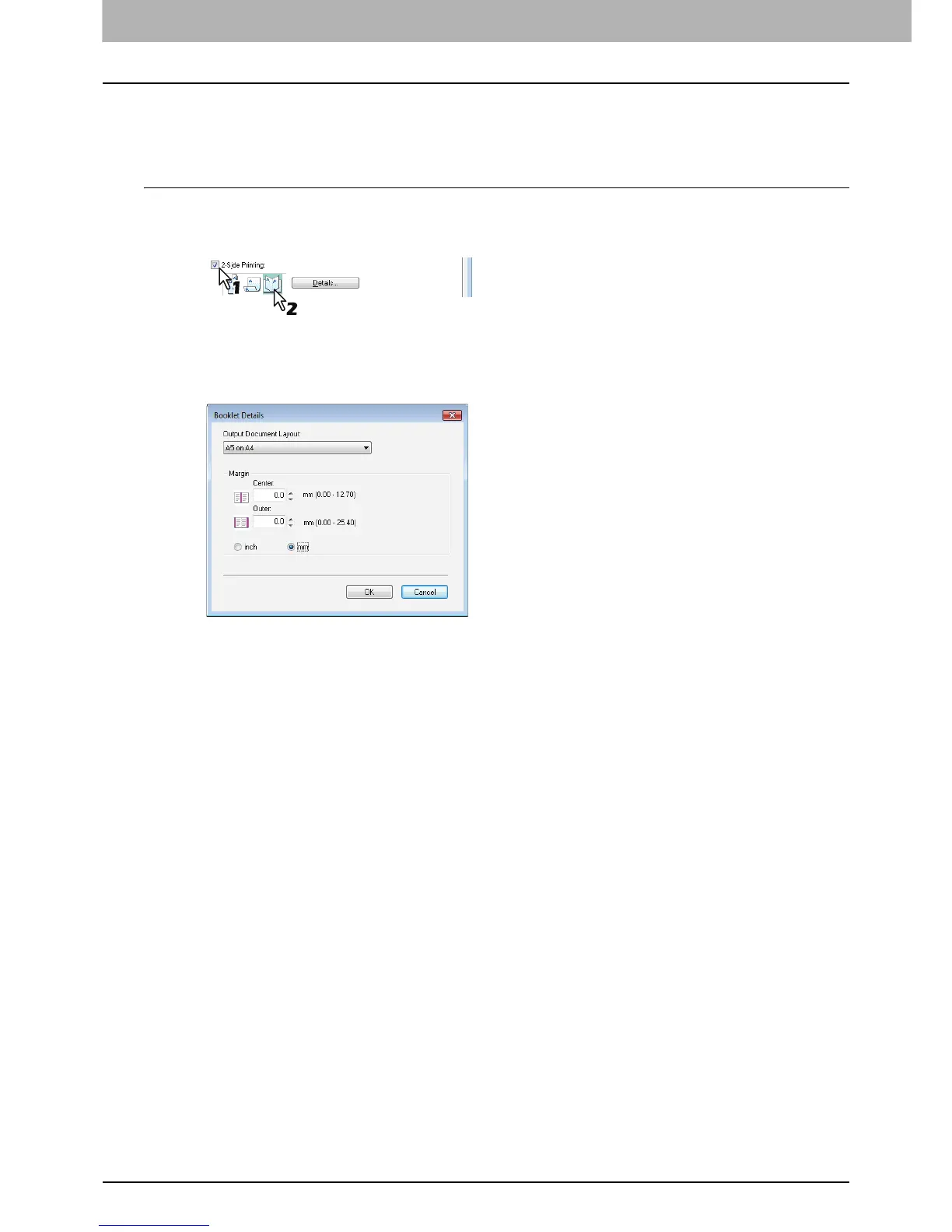
The [Booklet Details] dialog box appears.
4
Select the booklet size at the [Output Document Layout] box.
A5 on A4 — Select this to print an A5 size booklet. Every 2 pages are printed on A4 paper to fit on half a sheet
(A5).
A4 on A3 — Select this to print an A4 size booklet. Every 2 pages are printed on A3 paper to fit on half a sheet
(A4).
B5 on B4 — Select this to print a B5 size booklet. Every 2 pages are printed on B4 paper to fit on half a sheet (B5).
B6 on B5 — Select this to print a B6 size booklet. Every 2 pages are printed on B5 paper to fit on half a sheet (B6).
1/2 Folio on Folio — Select this to print a 1/2 Folio size booklet. Every 2 pages are printed on Folio paper to fit on
half a sheet.
A6 on A5 — Select this to print an A6 size booklet. Every 2 pages are printed on A5 paper to fit on half a sheet
(A6).
Letter-Half on Letter — Select this to print a 1/2 Letter size booklet. Every 2 pages are printed on Letter paper to
fit on half a sheet.
LT on LD — Select this to print a Letter size booklet. Every 2 pages are printed on Ledger paper to fit on half a
sheet (Letter).
1/2 LG on LG — Select this to print a 1/2 Legal size booklet. Every 2 pages are printed on Legal paper to fit on half
a sheet.
1/2 Statement on Statement — Select this to print a 1/2 Statement size booklet. Every 2 pages are printed on
Statement paper to fit on half a sheet.
1/2 Comp on Comp — Select this to print a 1/2 Computer size booklet. Every 2 pages are printed on Computer
paper to fit on half a sheet.
1/2 13LG on 13LG — Select this to print a 1/2 13 inch LG size booklet. Every 2 pages are printed on 13 inch LG
paper to fit on half a sheet.
1/2 8.5SQ on 8.5SQ — Select this to print a 1/2 8.5 inch SQ size booklet. Every 2 pages are printed on 8.5 inch SQ
paper to fit on half a sheet.
32K on 16K — Select this to print a 32K size booklet. Every 2 pages are printed on 16K paper to fit on half a sheet.
16K on 8K — Select this to print a 16K size booklet. Every 2 pages are printed on 8K paper to fit on half a sheet.



 To Next Page
 Loading...




