116
6.PRINTING LISTS AND REPORTS
2.AUTOMATICALLY PRINTING LISTS & REPORTS (Cont.)
6
Setting the Lists and Reports Output
Setting the (transmission/reception) Journal Output and its Number
- AUTO: ON, OFF
Setting whether the transmission/reception journal should be output automatically.
- Transmission journal: 40,120
Setting the number of communications on the transmission journal as 40 or 120.
- Reception journal: 40,120
Setting the number of communications on the reception journal as 40 or 120.
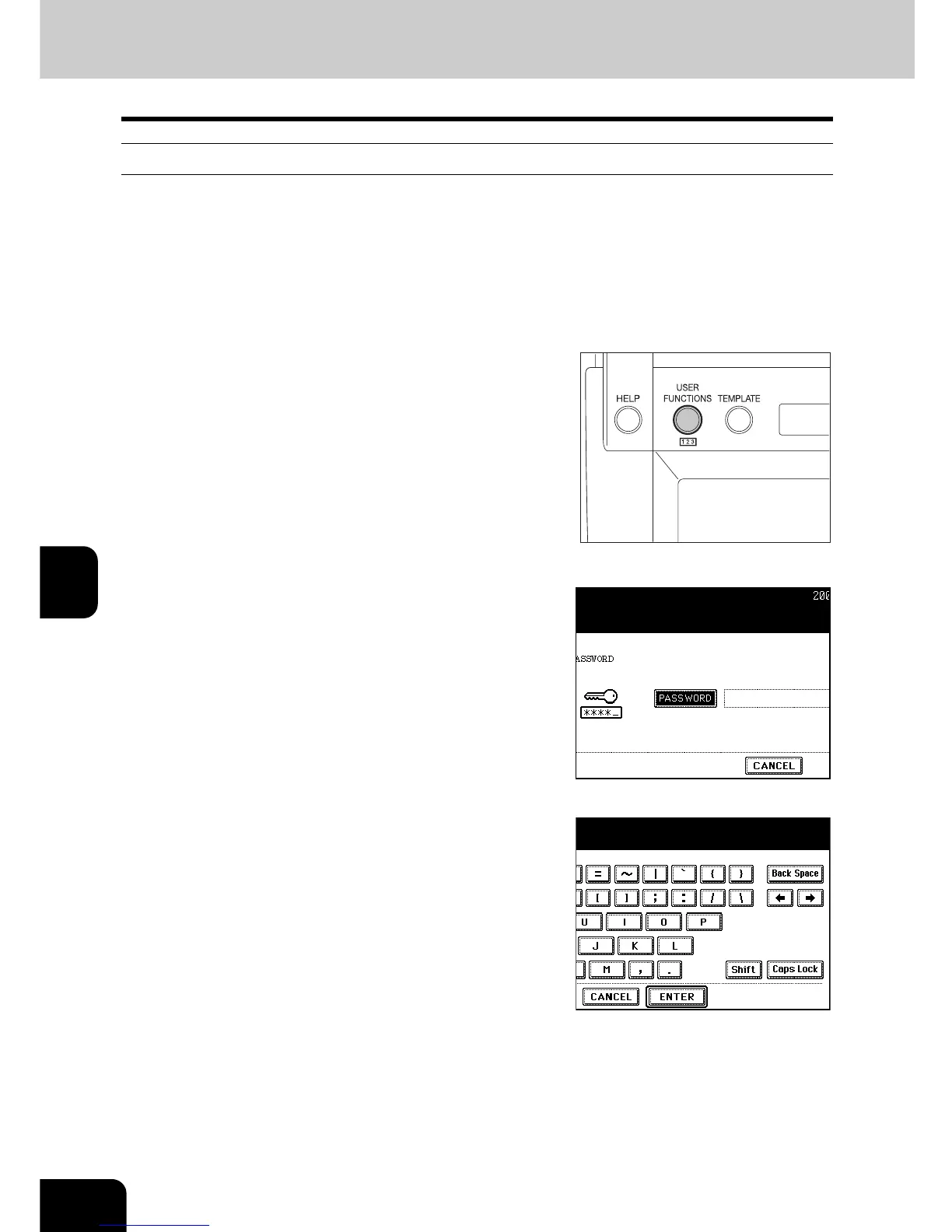
1
Press the [USER FUNCTIONS] button on
the control panel.
2
Press the [ADMIN] button to enter the
administrator password menu.
- See the [User Functions Guide] for the administrator password.
3
Press the [PASSWORD] button, enter the
administrator password, and then press
the [ENTER] button.



 To Next Page
 Loading...




