1
Press
FIX
: Move the louver in
the desired vertical direction.
2
Press
SWING
: Swing the air
automatically and press again to
stop.
3
For horizontal direction, adjust
manually.
DANGER
• Do not install, repair, open or remove the cover. It may expose you
to dangerous voltages. Ask the dealer or the specialist to do this.
• Turning off the power supply will not prevent potential electric
shock.
• The appliance shall be installed in accordance with national wiring
regulation.
• Means for disconnection from the supply having a contact
separation of at least 3 mm in all poles must be incorporated in the
fi xed wiring.
WARNING
• Do not expose your body directly to cool air for a long time.
• Do not insert your fi nger or any article into the air inlet/outlet.
• When an abnormality (burning smell, etc.) occurs, stop the air
conditioner and disconnect the power supply or turn off the
breaker.
• This appliance is not intended for use by persons (including
children) with reduced physical, sensory or mental capabilities, or
lack of experience and knowledge, unless they have been given
supervision or instruction concerning use of the appliance by a
person responsible for their safety.
• Children should be supervised to ensure that they do not play with
the appliance.
CAUTION
• Do not wash the unit with water. It may cause an electric shock.
• Do not use this air conditioner for other purposes such as
preserving food, breeding animal, etc.
• Do not step or put anything on the indoor/outdoor unit. It may
cause an injury or damage the unit.
• Do not touch aluminium fi n because it may cause an injury.
• Before cleaning the unit, turn off the main switch or the circuit
breaker.
• When the unit won’t be used for a long time, turn off the main
switch or the circuit breaker.
• It is recommended that maintenance be performed by a specialist
when the unit has been operated for a long time.
PRECAUTIONS FOR SAFETY
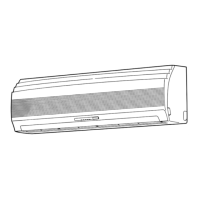
INDOOR UNIT DISPLAY
1 Hi POWER (Green)
2 FILTER (Orange)
3 PRE. DEF (DE-FROST) (Orange)
4 TIMER (Yellow)
5 OPERATION (Green)
6 RESET button
1
PREPARATION BEFORE USE
2
Preparing Filters
1. Open the air inlet grille and remove the air fi lters.
2. Attach the fi lters. (see detail in the accessory sheet).
Loading Batteries
1. Remove the battery cover.
2. Insert 2 new batteries (AAA type) following the (+)
and (–) positions.
Clock Setup
1. Push CLOCK ● by tip of the pencil.
2. Press
ON
or
OFF
: adjust the time.
3. Press
SET
: Set the time.
Remote Control Reset
1. Remove the battery.
2. Press .
3. Insert the battery.
AIRFLOW DIRECTION
3
Note:
• Do not move the louver manually by others.
• The louver may automation positioning by come operation mode.
REMOTE CONTROL
4
1
Infrared signal emitter
2
Start/Stop button
3
Mode select button (MODE)
4
Temperature button (TEMP)
5
Fan speed button (FAN)
6
Swing louver button (SWING)
7
Set louver button (FIX)
8
On timer button (ON)
9
Off timer button (OFF)
!
Sleep timer button (SLEEP)
"
Setup button (SET)
#
Clear button (CLR)
$
Memory and Preset button (PRESET)
%
One Touch button (ONE-TOUCH)
&
High power button (Hi-POWER)
(
Economy button (ECO)
)
Quiet button (QUIET)
~
Comfort sleep button (COMFORT SLEEP)
+
Filter reset button (FILTER)
,
Clock Reset button (CLOCK)
-
Check button (CHK)
ONE-TOUCH
5
Press the “ONE-TOUCH” button for fully automated operation that is
customised to the typical consumer preferences in your region of the world.
The customised settings control temperature air fl ow strength, air fl ow
direction and other settings to provide you alternate contact with “ONE-
TOUCH” of the button. If you prefer other settings you can select from the
many other operating functions of your Toshiba unit.
Press
ONE-TOUCH
: Start the operation.
AUTOMATIC OPERATION
6
To automatically select cooling, heating, or fan only operation
1. Press
MODE
: Select A.
2. Press
TEMP
: Set the desired temperature.
COOLING / HEATING / FAN ONLY
OPERATION
7
1. Press
MODE
: Select Cool , Heat , or Fan only .
2. Press
TEMP
: Set the desired temperature.
Cooling: Min. 17°C, Heating: Max. 30°C, Fan Only:
No temperature indication
3. Press
FAN
: Select AUTO, LOW , LOW+ , MED ,
MED+ , or HIGH .
DRY OPERATION
8
For dehumidifi cation, a moderate cooling performance is controlled
automatically.
1. Press
MODE
: Select Dry .
2. Press
TEMP
: Set the desired temperature.
A
C
L
Hi-POWER OPERATION
9
To automatically control room temperature and airfl ow for faster cooling or
heating operation (except in DRY and FAN ONLY mode)
Press
Hi-POWER
: Start and stop the operation.
ECO OPERATION
10
To automatically control room to save energy (except in DRY and FAN ONLY
mode)
Press
ECO
: Start and stop the operation.
Note: Cooling operation; the set temperature will increase automatically 1
degree/hour for 2 hours (maximum 2 degrees increase). For heating
operation the set temperature will decrease.
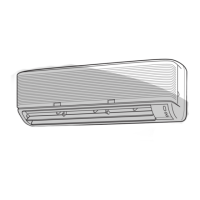
1 OPERATION (Green)
2 TIMER/CLEANING (Yellow)
3 RESET button
Models: RAS-137, 167SKV Series
Models: RAS-107SKV Series
02%3%4
/.%4/5#(
15)%4
37).'
4)-%2
/.
&),4%2
#(+
#,/#+
/&&
#,2
3,%%0
3%4
&)8 (I0/7%2 %#/
#/-&/24
3,%%0
-/$%
4%-0
&!.

 To Next Page
 Loading...