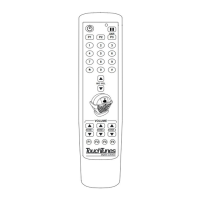
Key assignments and functionality
Th keys on the remote are pre-programmed for the following functions.
FCC Notice
This equipment has been tested and found to comply with limits for a Class B digital device, pursuant to Part 15 of the FCC rules. These limits are
designed to provide reasonable protection against harmful interference in a commercial environment. This equipment generates, uses, and can radiate
radio frequency energy and, if not installed and used in accordance with the instruction manual, may cause harmful interference to radio
communications. Operation of this equipment in a residential area is likely to cause harmful interference in which case the user will be required to
correct the interference at his own expense.
Note: Unauthorized modification of the receiver or radio remote control could void the user's authority to operate this equipment.
This product complies with the Canadian ICES-003 Class B specification.
Copyright © 2005 TouchTunes Music Corporation Printed in Canada
Key Function
Power Press to turn the jukebox monitor and audio subsystem on or off. The jukebox computer remains on. Equivalent
to pressing the Night Mode button on the jukebox (not available on all models).
Pause Pauses the jukebox.
Numeric keys Used to program the remote and for future use.
MIC VOL Raises and lowers the volume of the microphone within the limits set on the Mixer Settings screen.
P1 Give promotional credit: Press and release this button to add a credit to the jukebox. Credits are deducted from
the promotional credit count.
The promotional credit feature is enabled/disabled on the Credit Settings screen.
P2 For future use.
P3/Skip Skip song: Quickly press and release this button to stop playing the current song and immediately skip forward
to the next song in the queue. The skip song feature is enabled/disabled on the System Settings screen.
Flush play queue: Press and hold this button for four seconds to flush the entire play queue.
VOLUME ZONE 1, 2, 3 Raises and lowers the volume of the selected zone within the limits set on the Sound Mixer screen.
F1, F2, F3, F4 For future use.
CAUTION: Do not use or store the remote near any heat sources,
such as radiators, heat registers, stoves, or other apparatus
(including amplifiers) that produce heat.
CAUTION: Dispose of used batteries in accordance with the
regulations in your area. Do not incinerate.
TouchTunes Digital Jukebox, Inc.
3, Commerce Place, 4th Floor
Montreal, Quebec,
Canada, H3E 1H7
TouchTunes Music Corporation
180 Lexington Drive
Buffalo Grove, Il 60089
Technical Support
888-711-5853
www.touchtunes.com


 To Previous Page
 Loading...