86
2. Instrument cluster
4RUNNER (U)_(OM35B23U)
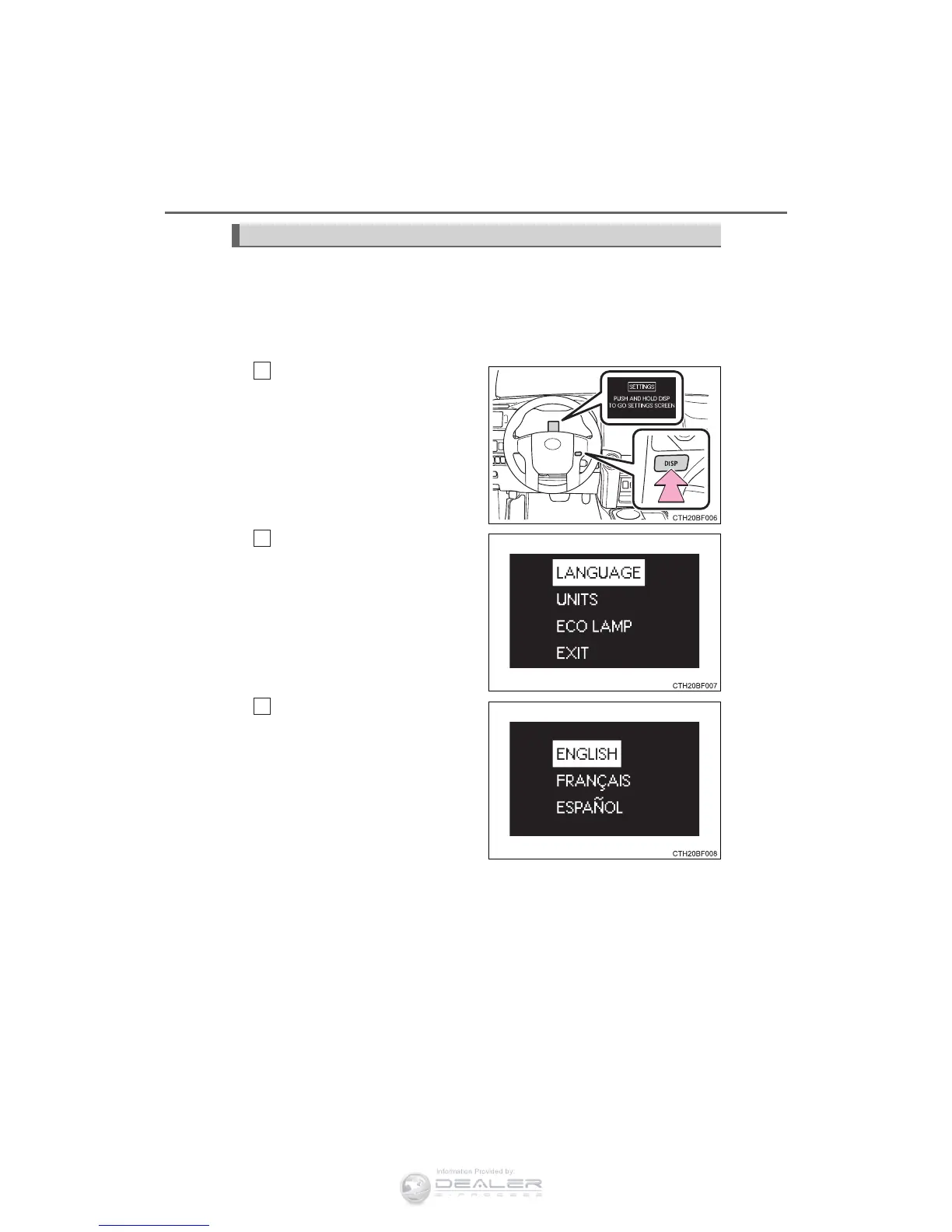
It is possible to customize the language, units and Eco Driving Indica-
tor Light settings using the “DISP” switch.
When customizing vehicle features, ensure that the vehicle is parked
in a safe place with the shift the shift lever to P and the parking brake
set.
Press the “DISP” switch to
display the setting screen
while the vehicle is stopped,
and then press and hold the
“DISP” switch to display the
customize mode screen.
Press the “DISP” switch to
select the item to be set, then
press and hold the “DISP”
switch.
Press the “DISP” switch to
select the desired setting,
and then press and hold the
“DISP” switch.
To go back to the previous screen or exit the customize mode, press
the “DISP” switch to select “EXIT”, and then press and hold the
“DISP” switch.
Customizing vehicle features
1
2
3











 To Next Page