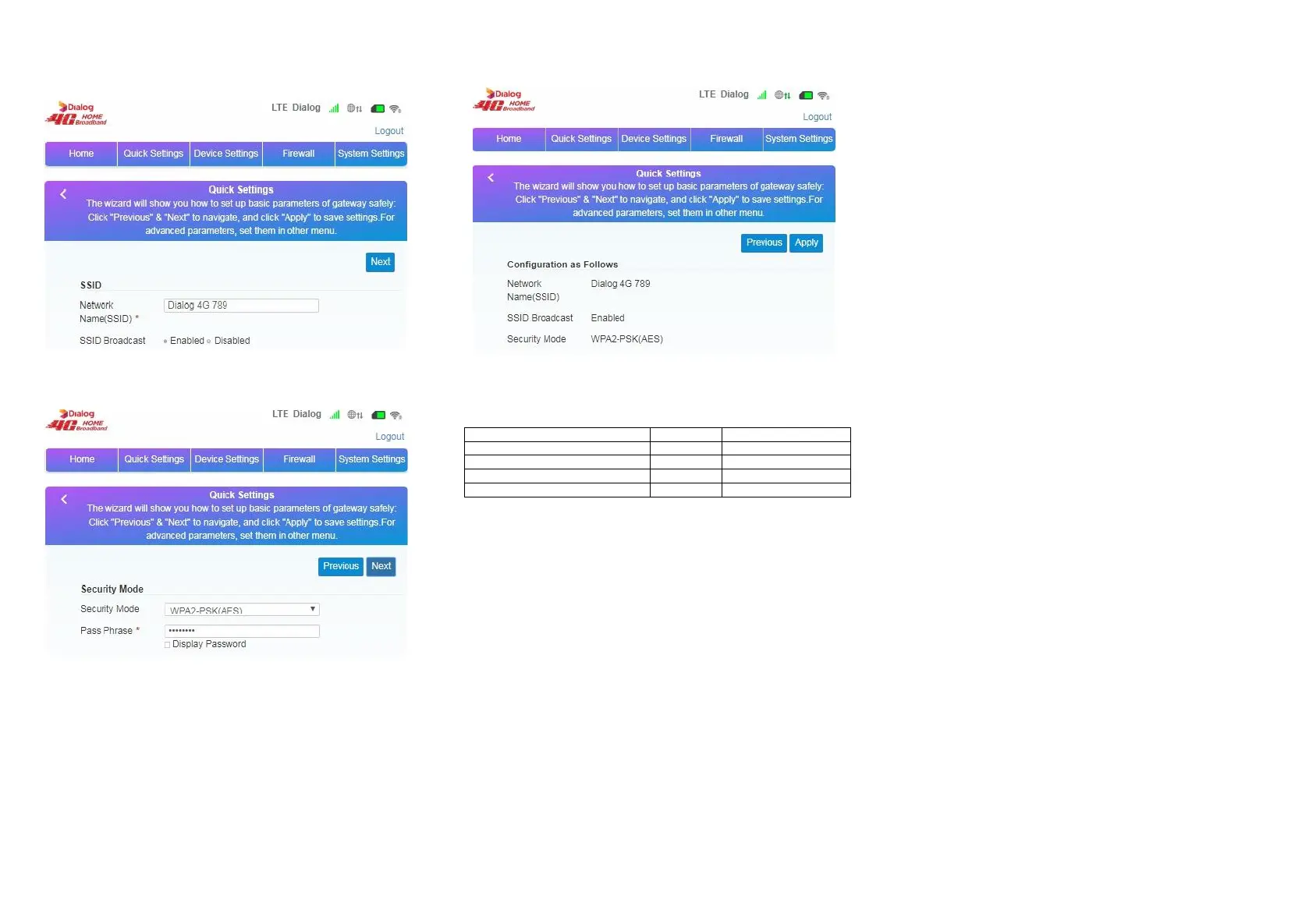
Step3:
Go to‘Quick Settings’tab
(1)SSID configuration - the user can customize the SSID
(2)Wi-Fi password settings – You can customize the Wi-Fi encryption
mode, and set your own password to ensure the security of the account.
(3)Preview the contents of the configuration - review settings and click
“Apply”.
5. Device List
Item UNIT Quantity
CPE unit 1
User manual PCS 1
Power adapter PCS 1
cable PCS 1
6. Customer Support
Hotline: 117 100 100
E-mail: techsupport@dialog.lk
Office:
Dialog Broadband Networks (Pvt) Ltd. (PV 261),
No. 475, Union Place, Colombo 02,
Sri Lanka
Tel +94 117 100 100 / FAX + 94 117 100 701
www.dialog.lk


 To Previous Page