Need help?
Do you have a question about the TOZO W1 and is the answer not in the manual?
The Fantasy Wireless Charger is an intelligent product designed for convenient and efficient wireless charging. Its primary function is to provide a wireless power transfer solution for mobile phones and other devices that support the Qi standard. This means users can charge their compatible devices without the need to plug a cable directly into the phone, offering a more streamlined and "limitless" experience. The charger is designed to be safe and user-friendly, aiming to integrate seamlessly into a modern lifestyle.
The charger is designed for straightforward use, involving a simple three-step process to get started and charge a device.
Powering the Charger: To begin, the user needs to connect the wireless charger to a power source. This is done by inserting one end of the provided USB charging cable into a power adapter (such as a wall adapter) or a computer's USB port. The manual illustrates this with images of a USB cable connected to both a wall adapter and a laptop, indicating flexibility in power source options. It's important to note that for optimal performance, especially for fast charging, a QC 2.0/3.0 adapter (5V-2A, 9V-1.67A) is required, though not included with the charger.
Establishing Connectivity: Once the charger is connected to a power source, the other end of the USB charging cable must be inserted into the USB port of the wireless charger itself. Upon successful connection, an LED indicator on the charger will light up. This LED serves as a visual confirmation that the charger is properly connected and ready to function, ensuring the user knows the device is powered on and operational.
Wireless Charging: With the charger powered and connected, the final step is to place a compatible mobile phone onto the wireless charger. The user must ensure that the phone is well-located within the designated charging area of the charger. The design of the charger includes a "Frosted PC plate" on the top surface, which likely serves as the primary contact area for the phone, and "Non-slip Pads" on the bottom to keep the charger stable on a surface. When the phone is correctly placed and begins to charge, the LED indicator on the charger will automatically light up again, this time to show the charging status. This provides clear feedback to the user that their device is actively receiving power.
The Fantasy Wireless Charger boasts universal compatibility, supporting a wide range of devices that are enabled for wireless charging. This includes various models from popular brands such as iPhone (e.g., X, Xs, XR, Xs Max, 8, 8 Plus) and Samsung Galaxy (e.g., Note8, Note9, S10, S10+, S9, S9+, S8, S8+/S8 Plus, S7, S7 Edge, S6, S6 Edge), as well as other Qi-enabled devices. This broad compatibility makes it a versatile charging solution for many users.
The charger also supports different fast charge modes depending on the device. For iPhone series, it offers a 7.5W Fast Charge Mode, which requires a QC 2.0/3.0 adapter (5V-2A, 9V-1.67A) for optimal performance. Similarly, for Samsung series, it provides a 10W Fast Charge Mode, also requiring a QC 2.0/3.0 adapter (5V-2A, 9V-1.67A). These fast charge capabilities enhance the user experience by reducing charging times for compatible devices.
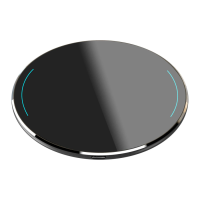
The physical design of the charger is described as having a "simple design." Key components include an "LED indicator area" for status feedback, an "Aviation aluminum shell" which suggests a durable and possibly premium build quality, and the "Frosted PC plate" on the top surface. The "Input Port of Power Supply" is located on the side, where the USB cable connects. The bottom features "Non-slip Pads" to prevent the charger from sliding on surfaces. The overall aesthetic appears to be a circular, flat disc shape, as depicted in the product outline diagrams.
The manual provides a few key "Attention" points regarding the care and use of the charger, which can be considered maintenance guidelines to ensure its longevity and safe operation.
Protection from Liquids: Users are advised to "Please keep the charger away from water or other liquid." This is a standard precaution for electronic devices to prevent damage from short circuits or corrosion, ensuring the internal components remain dry and functional.
Cleaning Instructions: If cleaning is necessary, the manual states, "If you need to clean the charger, please make sure it is not connected power supply." This is a crucial safety measure to prevent electrical shock or damage to the device during cleaning. It implies that the charger should be unplugged from both the power adapter/computer and the wireless charger itself before any cleaning is attempted. While the specific cleaning method (e.g., dry cloth, damp cloth) is not detailed, the emphasis is on disconnecting power.
Environmental Conditions: The charger is designed to operate within a specific temperature range: "Using Environment temperature remains 0 -45°C." This guideline helps users understand the optimal operating conditions for the device, preventing potential performance issues or damage that could arise from extreme cold or heat. Adhering to this temperature range contributes to the charger's reliable long-term performance.
In summary, the Fantasy Wireless Charger is a user-friendly, Qi-compatible device designed for convenient and efficient wireless charging, featuring simple setup, clear status indicators, broad device compatibility, and fast charging capabilities, all while requiring basic care to ensure its safe and effective operation within specified environmental conditions.
 General
| Input Voltage | 5V |
|---|---|
| Output Voltage | 5V |
| Charging Type | Wireless |
| Connector Type | USB-C |
| Input | 5V/1A |
| Output | 5V/1A |
| Wireless Charging Support | Yes |
| LED Indicators | Yes |
| Charging Case Battery Capacity | Not applicable |
| Charging Case Output | Not applicable |
| Charging Case Input | Not applicable |
| Charging Time (Case) | Not applicable |
| Charging Time (Earbuds in Case) | Not applicable |