RECALL MINIMUM/MAXIMUM
1. PressMIN/MAXtoviewtheminimumandmaximum
temperaturesrecordedsinceturningtheunitonor
sinceclearingmin/max.
2. PresstheMIN/MAXbuttononcetodisplaythe
minimumtemperature.Thelowerportionofthe
displayshows“MIN”indicatingthatthisisthe
minimumreading.WhileintheMIN/MAXmode,
selectthedesiredformatwiththe°F/°Cor
.0/.00/.000/.0000buttons.
3. PresstheMIN/MAXbuttonagaintodisplaythe
Maximumtemperature.Thelowerportionofthe
displayshows“MAX”indicatingthatthisisthe
maximumreading.Athirdpresswillreturnthe
displaytothecurrentreading.
4. MIN/MAXmaybereviewedatanytime.
5. TocleartheMIN/MAX,placetheunitinnormalmode
(notreviewingtheMIN/MAX)andpressMIN/MAX
andCLEARsimultaneously.Youmayalsoclear
MIN/MAXbyturningtheunitoff.
HOLD FUNCTION
1. PresstheHOLDbuttononceto“freeze”thedisplay
atthecurrenttemperaturereading.“HOLD”appears
onthelowerportionofthedisplayindicatingthatthe
unitisinholdmode.
2. WhileintheHOLDmode,selectthedesiredformat
withthe°F/°Cor.0/.00/.000buttons.
3. PresstheHOLDbuttonasecondtimetoreturnto
thecurrenttemperaturereading.“HOLD”willno
longerappearonthedisplay.
POWER
Donotturntheunitonandoffrapidly.Itmaylockthe
display.Whenturningtheuniton/offthemicroprocessor
maybecomelocked,inoperable,orthedisplaymay
read“888888.”Ifthisoccurs,resetthethermometerby
removingthebattery,waiting15seconds,andreplacing
thebattery.
OPERATION
1. Plugtheprobeintothereceptaclelocatedontheright
sideoftheunit.
2. PresstheON/OFFbuttontoturntheuniton.
3. Pressthe°F/°Cbuttontochangethedisplay
betweenFahrenheitandCelsius.
4. Pressthe.0/.00/.000/.0000buttontochangethe
displaytoreadthedesiredresolution.
5. Usetheprobetomonitortemperaturesinair/gas,
liquids,andsemi-solids.Placethestainless-steel
portionofprobeincontactwiththematerialtobe
measured.Inmostinstancesthedepthoftheprobe
needstobeapproximately½inch.
6. PresstheON/OFFbuttontoturntheunitoffwhenthe
thermometerisnotinusetoprolongbatterylife.
HISTORY MODE
Historyprovidesaneffortlessmethodtoobservewhena
temperaturechangetakesplace.Itcontinuouslydisplays
forthepast24hoursstartingwith1hourago.Ifleftonfor
morethan24hours,itdisplaysonlythemostrecent24
hours.Historymaybereviewedatanytime.
1. After1hour,presstheHISTORYbuttononceto
showthecurrentorfirsthourreading.Thedisplay
willshow“1”onthefarrighttoindicatethisisthefirst
reading.Afterapproximatelytwoseconds,thedisplay
willshowthetemperatureand“min”whichindicates
thisistheminimumreadingforthefirsthour.After
approximatelytwomoreseconds,thedisplaywill
againshow“1”.Thedisplaycontinuestoalternate
betweenthesetwodisplays.Whileinthehistory
mode,the°F/°Cor.0/.00/.000buttonsmaybeused
toselectthedesiredformat.
2. ThesecondpressoftheHISTORYbuttonshowsthe
maximumtemperatureforthecurrentorfirsthour.
Afterapproximatelytwomoreseconds,thedisplay
willshow“1”.
3. WitheachpressoftheHISTORYbutton,theunit
willscrollthroughall48minimumandmaximum
readings.
4. Toexitthehistorymode,presstheCLEARbutton
orMIN/MAXbutton.Aslongastheunitisinthe
historymode,pressingtheCLEARbuttonalonewill
notclearthehistory.
5. Toclearhistory,firstexitthehistorymodeandthen
pressHISTORYandCLEARbuttonssimultaneously.
Turningtheunitoffdoesnotclearthehistory.
SPECIFICATIONS
Range: -328.00to932.000°F
-200.00to500.000°C
Resolution: 0.001°,0.01°or0.1°
(userselectable) from-99to932°F/-99to500°C
0.01°or0.1°
from-328to-100°F/-200to-100°C
0.0001°from-9.9999to99.9999°F/°C
Sampling Rate: approximately2timespersecond
Memories: 48MemoriesarestoredintheHistory
Mode(min/maxforthepast24hours)
2MemoriesarestoredintheMin/Max
Mode(min/maxforthecurrenthour)
Probes Supplied:
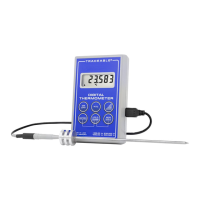
Model 6412suppliedwithafastresponse,handle-probe.
Thestainlesssteelportionoftheprobeiscapableof
measuringtemperaturesthroughtheentirerange(-328to
932°F/-200to500°C)
Model 6413suppliedwithafastresponse,bullet-probe
withPTFEcable.Thesensorand cablearecapableof
beingsubjectedtotemperaturesof-148to392°F/-100
to200°C
BUTTON DESCRIPTION
ON/OFF Turnsunitonandoff.
°F/°C: Selects°Fahrenheit/°Celsius
.0/.00/.000/.0000 Selectsdecimalpointondisplay
HISTORY Displayshistorymemories
HOLD/CLEAR Presstoholdreadingalsousedin
conjunctionwithHISTORYor
MIN/MAXbuttonstoexitthemodeor
clearreadings.
MIN/MAX Displaysthehighestandlowest
temperaturesrecordedforthecurrent
hour.
DISPLAY MESSAGES
▲Appearingindicatestemperatureisrising.
▼Appearingindicatestemperatureisfalling.
“LLL” Displayedwhenthetemperaturebeing
measuredisbelowtherangeoftheunitorwhen
thereisanopenprobeornoprobe.
“HHH” Displayedwhenthetemperaturebeing
measuredisabovetherangeoftheunitor
whenthereisashortedprobe.
“BAT” Displayedwhenthebatteryislowandneedsto
bereplaced.SeeBatterysectionforbattery
replacementinstructions.
RECEPTACLES
Thereceptacleontherightsideoftheunitisforthe
probe.Theupperleftsidereceptacleisforanaccessory
ACAdaptor.Thelowerleftsidereceptacleisforthe
accessoryDataAcquisitionSystemdatacable.
DATA OUTPUT
Inordertousethedataoutput,theAccessory Data
Cable Cat No. 4099isrequired.SeeAccessoriessection
fororderinginformation.
Withtheaccessorydatacableattached,totogglethe
RS232outputon/off,pressandholdthe°F/°Cand
.0/.00/.000/.0000simultaneously(2320indicates
RS232outputis“on”,232FindicatesRS232output
is“off”).
BATTERY
If“BAT”appearsonthedisplay,itindicatesthe
batteriesarelowandneedtobereplaced.Toreplace
thebattery,slidethebatterycoverlocatedontheback
oftheunitawayfromtheunit.Removetheoldbattery
andreplaceitwithanew9-Voltalkalinebattery.Usean
alkalinebattery,NOTaregularorheavydutybattery.
Properlyconnectthebattery.Replacethebatterycover.
Incorrectlyinstalledbatteriesmaydamageelectronics.
ALL OPERATIONAL DIFFICULTIES
Ifthisthermometerdoesnotfunctionpropertyforany
reasonpleasereplacethebatterywithanew9-Volt
alkalinebatteryBatterysection,above).Lowbattery
powercanoccasionallycauseanynumberof“apparent”
operationaldifficulties.Replacingthebatterywithanew
freshbatterywillsolvemostdifficulties.


 To Next Page
 Need help?
 General