4
3
2
1 5
R
L
VIDEO
Pr
Pb
Y
DC I N 12V
COAXIAL
14
6
12
11
13
9
7
15
10
8
5
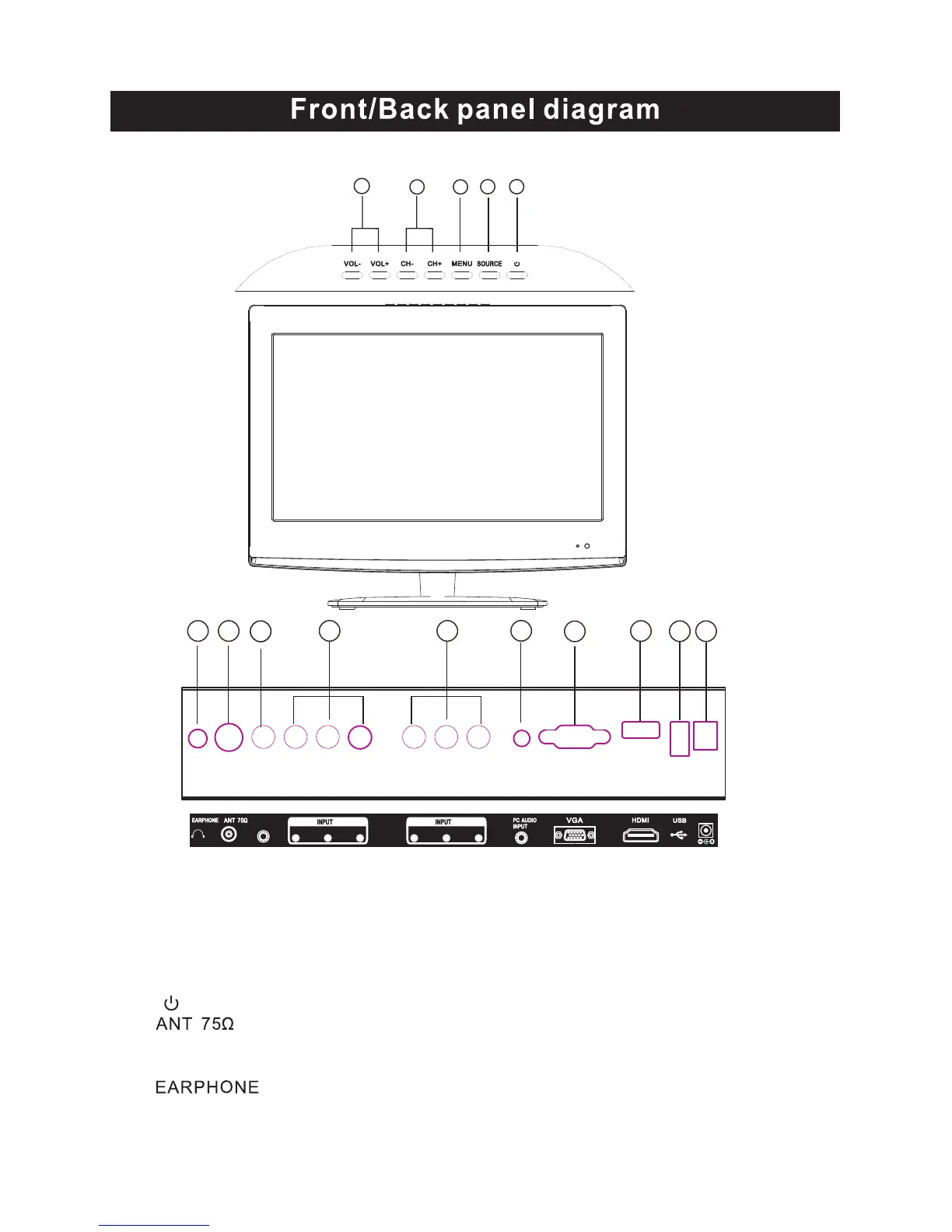
1.SOURCE Source select
2.MENU Into or exit from menu
Use CH+/- button select item,
VOL+/- button adjust item
3.CH+/- Select channel
4.VOL+/- Adjust Volume
5. Turn on/off TV .
6. .
7.HDMI 1 Input:Digital signal input
from HDMI video connector.
9 .VGA Input.
10.
11.Y Pb/Cb Pr/Cr:Color difference
components input and relevant
video input .
12.AV Input:External AV signal input and
relevant right/left sound channel inputs.
13.VGA Audio Input.
15.USB Input.
14.COAXIAL Output.
DC 12V
Connect to mains adapter socket
Earphone output
(When earphones are plugged in, speakers are disabled)
8.


 To Next Page