Need help?
Do you have a question about the TRANSTEK TeleRPM BS-2001-G1 and is the answer not in the manual?
Symbol indicating necessary operator awareness or action to avoid consequences.
Guidelines on ideal locations and avoiding hazardous environments for scale use and storage.
Instructions for accurate measurements, including timing and surface conditions.
Important warnings covering device use, environment, user groups, and potential hazards.
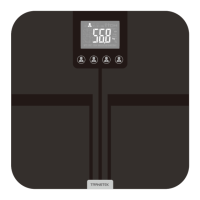
Identifies the physical parts of the scale, including display and battery compartment.
Explains the meaning of symbols and codes shown on the scale's display.
Step-by-step guide for inserting batteries and initial scale synchronization.
Instructions on how to change the preferred unit of measurement (lbs, kg, stone).
Important warnings regarding battery replacement, mixing, and disposal.
Detailed steps for taking a measurement, including post-measurement actions.
Explains the indicator for successful data transmission.
Explains common error codes and provides solutions for issues like overload or low battery.
Addresses common problems during measurement, like no display or automatic power-off.
Lists product name, dimensions, and weight.
Details measurement range, division, and accuracy specifications.
Outlines working/storage environments, power source, and battery life.
Covers auto-on/off, accessories, mode of operation, and ingress protection.
Guidelines for proper cleaning and maintenance to ensure device longevity.
Warns against disassembling or performing maintenance while the device is in use.
Details the duration of the warranty and common exclusions like misuse or damage.
Explains FCC rules for digital devices and potential interference.
Details compliance with FCC radiation exposure limits and SAR requirements.
Declares compliance with standards for electromagnetic emissions.
Declares compliance with standards for electromagnetic immunity.
Provides contact information for the manufacturer and customer support.
This document describes the Transtek Pro Cellular Body Scale (BS-2001-G1), a device designed for home healthcare environments to measure a person's weight. It is suitable for individuals 10 years and older who can read and understand the user guide. The scale is not intended for infants or for diagnosing or treating medical conditions.
The Pro Cellular Body Scale measures body weight and automatically transmits the results via a cellular connection. It features a digital LCD display for showing measurements and various status codes. The scale is equipped with a data transmission function, allowing it to emit electromagnetic energy to perform its intended function.

 To Next Page
 General