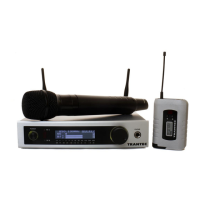
This document outlines the features, specifications, and operational guidelines for the Trantec S2.4-RX2-G3 2.4GHz Digital Wireless Microphone System.
Function Description:
The Trantec S2.4-RX2-G3 is a digital wireless microphone system designed for audio transmission. It operates on the ISM 2.4GHz digital audio frequency band, which automatically filters out radio interference. The system offers 16 selectable channels and utilizes digital audio processing technology to ensure natural and clear sound reproduction. A smart ID code identifying synchronization technology simplifies the installation process. The system includes a receiver, two microphones (handheld and body-pack options), an audio cable, a power adapter, and batteries.
Important Technical Specifications:
- Carrier Frequency: 2.404-2.474GHz
- Available Channels: 16 CHANNELS
- Band Range: 2MHz
- Dynamic Range: 85dB
- Total Harmonic Distortion: <0.1%
Receiver:
- Power Supply: DC12V 1.0a
- Consumption Power: 2WATT
- Signal Noise Ratio: >95dB
- Receiving Sensitivity: -80dBm
Hand Mic (Microphone):
- Transmitter Power: 10mW
- Modulation Type: GFSK
- Ultraharmonics: <20dB
- Battery Voltage: 2x1.5V AA BATTERY
- Battery Life: 5 HOURS
Body-Pack Mic (Microphone):
- Transmitter Power: 10mW
- Modulation Type: GFSK
- Ultraharmonics: <20dB
- Battery Voltage: 2x1.5V AA BATTERY
- Battery Life: 5 HOURS
General Features:
- Frequency Band: 2.4GHz ISM band
- Modulation: GFSK
- Operating Distance: Up to 30M in obstacle-free environments
- Audio Format: 16bit, 38.4KHz
- Noise: No RF noise
- Battery Consumption: Low, allowing for more than 5 hours of use
- Channels: 16 available channels
Usage Features:
Receiver Controls and Functions:
The receiver unit features:
- POWER: On/Off switch.
- CH. A VOLUME CONTROL: Adjusts the volume for Channel A.
- ID A: ID button for Channel A.
- ID A DOWN BUTTON: Decreases the ID for Channel A.
- ID A UP BUTTON: Increases the ID for Channel A.
- LCD DISPLAY: Shows system information.
- ID B UP BUTTON: Increases the ID for Channel B.
- ID B DOWN BUTTON: Decreases the ID for Channel B.
- ID B: ID button for Channel B.
- CH. B VOLUME CONTROL: Adjusts the volume for Channel B.
- ANT. A - REMOVABLE: Removable antenna for Channel A.
- ANT. B - REMOVABLE: Removable antenna for Channel B.
- CH. B BALANCED OUT: Balanced audio output for Channel B.
- CH. A BALANCED OUT: Balanced audio output for Channel A.
- MIX OUTPUT: Mixed audio output.
- DC INPUT: Power adapter input.
Receiver Operation:
- Power Connection: Connect the provided power adapter to the DC input jack (16) on the receiver.
- Audio Output Connection: For mixed audio, insert the audio cable into the MIX OUTPUT jack (15) and connect the other end to a mixer or amplifier's MIX IN or AUX IN.
IR Sync Step (Under operating situation):
- Microphone Preparation: Insert two 1.5V AA batteries into the microphone compartment and turn on the microphone.
- Initiate Sync: Press the ID button on the receiver until the signal icon appears on the LCD display. A beep will be heard. Then, double-press the microphone power button; the microphone indicator will flash.
- Completion: The microphone is working when the sound disappears and the microphone indicator stops flashing.
Body-Pack Transmitter Features:
- MICROPHONE: Input for microphone.
- INPUT SOCKET: For connecting external audio sources (e.g., electronic guitar, headset).
- -VOL+: Volume control.
- ON OFF/MUTE: Power and mute button.
- POWER INDICATOR: Lights up when power is low.
- ANTENNA: For signal transmission.
- LCD DISPLAY: Shows system information.
- ID SETTING SWITCH: For setting the ID.
- BATTERY COMPARTMENT: Holds 2x1.5V AA batteries. Pay attention to correct polarity.
- BATTERY COVER: Secures the battery compartment.
Body-Pack Transmitter Connections:
- Supports connections for headset, electronic guitar, and LAN mic.
- Correct polarity for battery insertion is crucial.
Maintenance Features and Cautions:
General Cautions:
- Interference: This equipment generates and radiates wireless frequency energy. Use it in accordance with local statutes. Trantec provides products with different frequencies; choose the one that complies with local requirements. The manufacturer is not responsible for problems caused by breaking local statutes.
- Troubleshooting Interference: If interference occurs, try relocating the receiving antenna, changing the working frequency, checking surroundings for similar frequencies, or consulting the dealer or an experienced audio technician.
Copyright:
- This manual is copyrighted. No part of it may be copied or reproduced without permission. Specifications and information are subject to change without notice.
Noted (Important Usage and Maintenance Guidelines):
- Receiver Placement: Avoid placing the receiver in locations that could affect signal reception.
- Handling: Do not throw, drop, flap, or toss the device while it is operating.
- Water Exposure: The machine is not waterproof; avoid getting it wet.
- Battery Installation: Always insert batteries with the correct polarity. Remove batteries from the transmitter if not using for a long period to prevent leakage.
- Power Down: Pull out the AC adapter after using the receiver.
- Battery Replacement: Turn off the transmitter before replacing batteries.
- Servicing: There are no user-serviceable components inside. Opening the receiver will void the warranty.
- Cleaning: Use a soft cloth to clean the machine. Do not use gasoline or thinner.
Dual Receiver Note:
- For simultaneous microphone thresholds, Trantec recommends a maximum of 6 transmitters operating with a maximum of 3 dual receivers for best performance.

 Need help?
 General

 To Next Page