IMPORTANT NOTES
Register your product on www.tranya.com to get an EXTRA three-month
warranty for free.
Before using the T10 wireless earbuds, please charge both the case and
earbuds.
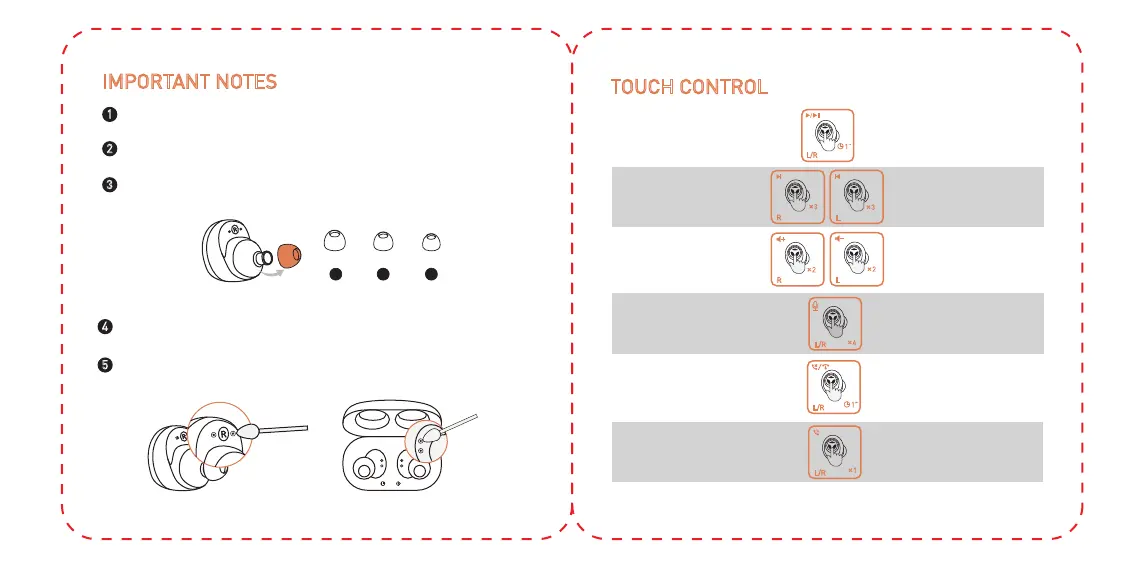
We provide three pairs of rubber eartips (including the set installed on the
earbuds), please choose the best fit for you.
1
2
3
L M S
4
If both earbuds don't sync together, please reset the earbuds.
If the earbuds don’t charge, please clean the charging slot on the case
and the contact surface on the earbuds.
5
TOUCH CONTROL
L/R
1”
Play / Pause
Press and hold for
1 second (L/R)
3
L
R
3
Next/Previous track
Tap three times (R/L)
L
2
2
R
Volume up/down Tap twice (R/L)
1
L/R
Answer a call Tap (L/R)
L/R
1”
Reject/End a call
Press and hold for
1 second (R/L)
Activate Siri/other voice
control software
4
L/R
Tap 4 times(L/R)


 To Next Page