2
Top
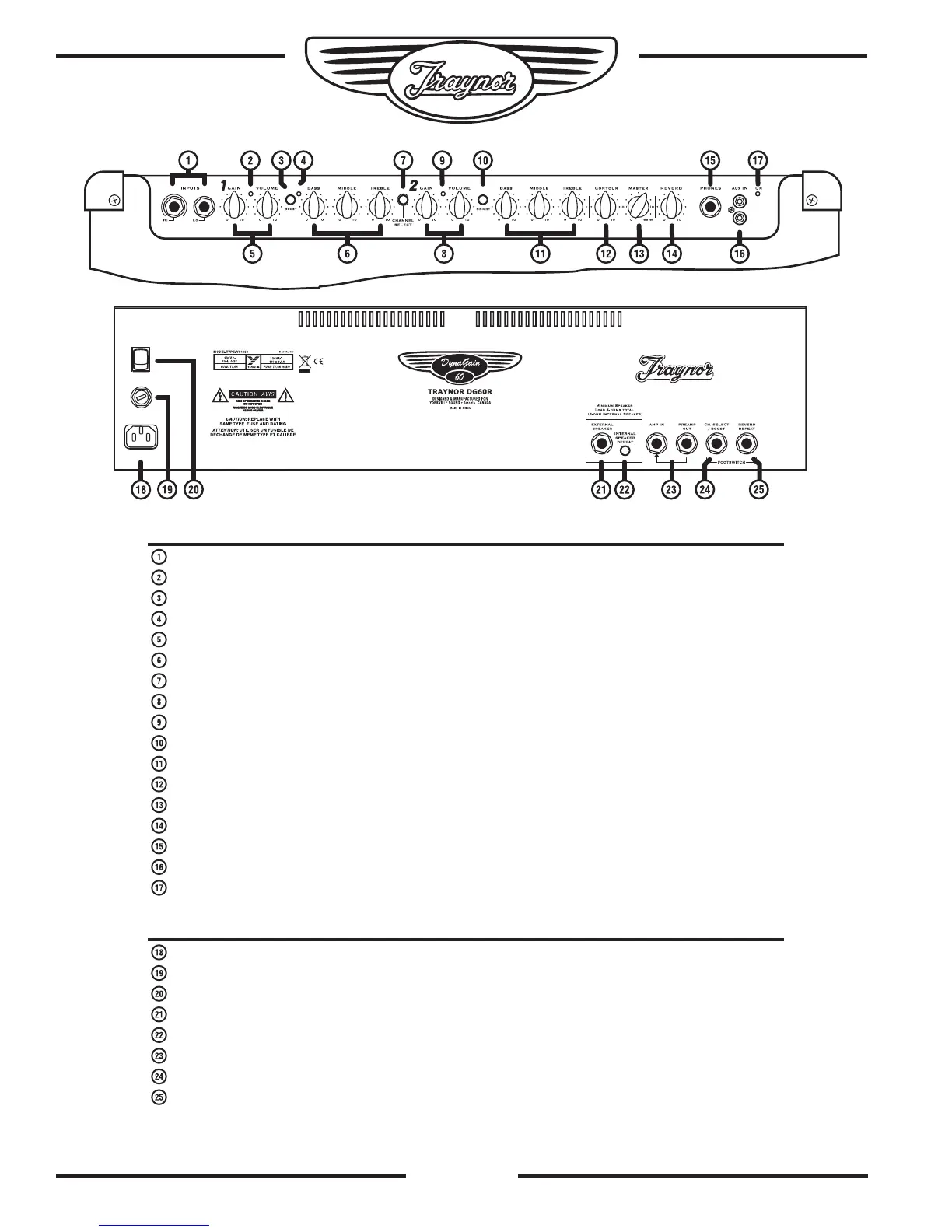
Input Jacks – two ¼-inch phone jacks. Hi and Lo gain.
Channel 1 indicator LED – Illuminates yellow when active.
Channel 1 Boost Switch – Activates the boost circuitry for extra crunch.
Boost LED – Illuminates red when the boost is active.
Channel 1 Gain and Volume controls.
Channel 1 Tone Controls – Treble, Bass, and Middle.
Channel Select Switch – Channel 1 is optimized for lead, Channel 2 for clean sound
Channel 2 Gain and Volume Controls.
Channel 2 Indicator LED – Illuminates green when active.
Channel 2 Brightness Switch – Add sparkle to your clean sound.
Channel 2 Tone Controls – Treble, Bass, and Middle.
Contour Control – Adjusts the character from vintage tones to modern sounds.
Master Control – Adjusts the amount of output power available.
Reverb Control – Adjusts the 24-bit DSP reverb level for both channels
Headphone Jack – Speaker emulated output. Can also be used as a line out.
Aux In – For connection of CD-player or an MP3 player.
Power Indicator – Illuminates green when the amplifier is turned on.
Rear
Power Receptacle.
Fuse holder.
Power Switch
Extension Speaker jack –¼-inch phone jack.
Internal Speaker Defeat switch- disconnects the internal speaker from the amplifier.
Amp In and Preamp Out jacks – ¼-inch phone input and output jacks.
Channel Select Footswitch jack – uses a ¼-inch TRS standard latching dual-footswitch.
Effects Defeat jack- uses a ¼-inch TRS standard latching dual-footswitch.


 To Next Page