7
To change tracks on the E3, press and hold the Volume - button for 1 second
ɈȌȯǶƊɯɈǘƵȁƵɮɈɈȲƊƧDzƊȁƮȯȲƵȺȺƊȁƮǘȌǶƮɈǘƵVolume + button for 1 second to play
the previous track.
ANC FUNCTION
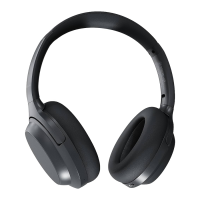
The TREBLAB E3 headphones feature the Feedforward Active Noise Cancellation
(ANC) technology. This technology provides the ability to not only decrease the sur-
rounding noise in ANC mode but also alternatively increase some frequencies of sur-
round sound in Environmental sound mode to hear voices when using the E3 head-
phones. These functions can be used with and without playing any music.
• To turn ON the ANC mode, press and hold the ANC button on the left earcup.
The ANC LED indicator near the button will turn green.
• To turn ON the Environmental sound, press shortly the ANC button.
• To turn OFF the ANC functions, press shortly the ANC button again.
NOTE: Please keep the deduction microphone holes on both earcups not blocked
when using the ANC/Environmental functions.



 To Next Page