Need help?
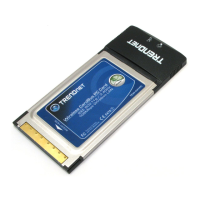
Do you have a question about the TRENDnet TEW-441PC - 108Mbps Wireless PC Card TEW-441PC and is the answer not in the manual?
Steps for installing the TEW-441PC adapter, including shutdown, PC card insertion, and driver installation.
Steps for installing the TEW-443PI adapter, including shutdown, opening case, PCI card insertion, and driver installation.
Instructions on how to connect to a wireless network that does not require a password or security key.
Instructions for connecting to a wireless network that requires a security key or passphrase.
Details on how to contact TRENDnet technical support for US, Canada, Europe, and worldwide.
Information and guidance for registering TRENDnet products online via the company's website.
 General
| Model | TEW-441PC |
|---|---|
| Category | Network Card |
| Device Type | Wireless PC Card |
| Form Factor | PC Card |
| Interface | PCMCIA |
| Wireless Standard | 802.11b/g |
| Maximum Data Rate | 108Mbps |
| Data Transfer Rate | Up to 108Mbps |
| Frequency Band | 2.4GHz |
| Encryption | 64/128-bit WEP, WPA, WPA2 |
| Operating Systems Supported | Windows 98SE/ME/2000/XP |
| Compliant Standards | IEEE 802.11g, IEEE 802.11b |

 To Next Page