EasyManua.ls Logo

Trends UK HEY DUGGEE HD21 - User Manual

Trends UK HEY DUGGEE HD21
3 pages
Print Icon
To Next Page IconTo Next Page
Loading...
INSTRUCTION MANUAL
DUGGEE
SMART TABLET
3+
WARNING! All packing materials such as internal bags,
plastic collars, plastic films and carton inserts are not part of this
product and should be discarded for your child’s safety.
Important
information
This toy is
recommended for
children aged 3 years
and over
Please retain this
manual for future
reference
Check toys regularly
and discard if any
part is damaged
or broken
Item Number: HD21
Customer Services:
+44 ( 0 )1702 208175
For more fun learning toys go to
www.trendsuk.co.uk
Remove all packaging materials
before giving this toy to a child.
Details and colour of parts may vary.
Subject to availability.
Conforms to safety requirements.
Requires batteries: 3 x AAA.
Made in China.
Trouble Shooting
If the tablet does not turn on Check that the batteries are installed
correctly, or install new batteries.
If the volume is too low Install new batteries
The sounds are very high or
low rate of speed Install new batteries
If there is a continuous buzzing sound Install new batteries
If the light of the toy becomes dim Install new batteries
Care Instructions
• Keep the unit clear by wiping it with a slightly damp cloth
• Keep the unit out of direct sunlight and away from any direct heat source
• Do not expose the unit to moisture or water
This product complies with the essential requirements of the European Toy Safety
Directive.
Important information
5
activities
HEY DUGGEE (WORD MARK AND CHARACTER LOGOS) ARE TRADE MARKS OF STUDIO
AKA LIMITED AND ARE USED UNDER LICENCE. HEY DUGGEE LOGO © STUDIO AKA LIMITED
(2014). LICENSED BY BBC STUDIOS. BBC IS A TRADE MARK OF THE BRITISH
BROADCASTING CORPORATION AND IS USED UNDER LICENCE. BBC LOGO © BBC 1996.
Trends UK Ltd., Greatworth Hall, Banbury, OX17 2DH. UK
Email: trends@jgdirect.net
Trends Toys Ireland, 8-9 Marino Mart,
Dublin 3, D03 P590
Question and Answer IconNeed help?

Do you have a question about the Trends UK HEY DUGGEE HD21 and is the answer not in the manual?

Summary

How to Play

Tablet Interaction Basics

Instructions for turning on the tablet and interacting with images to discover names and sounds.

Activity Interaction Details

Guidance on using buttons to identify badges, colours, letters, phonics, characters, and numbers.

Battery Management

Changing Batteries

Step-by-step instructions for replacing batteries, including required types and compartment handling.

Important Battery Information

Key guidelines on battery insertion, mixing types, recharging, disposal, and usage.

Troubleshooting

Common Tablet Issues

Solutions for issues like the tablet not turning on, low volume, or sound speed problems.

Care and Safety

Care Instructions

Guidelines on cleaning the unit, avoiding direct sunlight, heat, moisture, and water.

Product Compliance

Statement of compliance with European Toy Safety Directive and details on item number.

Overview

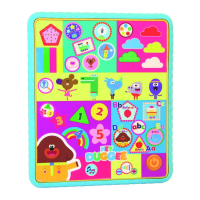
The Hey Duggee Smart Tablet is an interactive educational toy designed for children aged 3 years and over, offering five engaging activities to promote early learning. This tablet helps children learn about colours, numbers, shapes, letters, characters, and badges through interactive play.

Function Description:

The tablet features a user-friendly interface with various touch-sensitive areas representing different learning categories. To begin, users press the "On/Off" button, indicated by a heart icon. Once activated, pressing any image on the tablet will reveal its name and associated sound, encouraging auditory and visual recognition.

The five core activities are:

  1. Badges Identification: Pressing a dedicated button allows children to identify different badges. Pressing it again provides more detailed information about each badge.
  2. Character Learning: A specific button enables children to learn about the various characters from Hey Duggee. Pressing this button multiple times provides additional information about each character.
  3. Number and Shape Recognition: This activity focuses on teaching numbers and shapes. Children can interact with the corresponding areas to learn and identify these concepts.
  4. Letter and Phonics Learning: A button dedicated to letters and phonics allows children to identify letters and hear their phonetic sounds. Pressing the button again provides further auditory reinforcement.
  5. Colour Identification: Specific buttons are designated for identifying colours, helping children learn and differentiate between various hues.

Additionally, the tablet includes a "Press to hear questions" feature, which likely prompts children with questions related to the content, fostering active recall and engagement. There's also a button to hear funny sounds at any time during a game, adding an element of fun and surprise. The sound volume can be adjusted using a dedicated control.

Important Technical Specifications:

  • Age Recommendation: Suitable for children aged 3 years and over.
  • Battery Requirements: Requires 3 x AAA (LR03) 1.5V batteries.
  • Automatic Shut-Off: To conserve battery life, the unit automatically switches off after approximately one minute of inactivity. It can be re-activated by pressing the "On/Off" button.
  • Safety Compliance: The product complies with the essential requirements of the European Toy Safety Directive.

Usage Features:

  • Battery Installation: Batteries must be inserted or removed by an adult. A suitable screwdriver is required to remove the battery cover located on the rear of the product. When inserting batteries, ensure the + and - terminals match the markings inside the compartment. The battery compartment cover should be tightened securely but not over-tightened.
  • Battery Safety:
    • Do not mix battery types (e.g., alkaline and zinc carbon) or old and new batteries.
    • Non-rechargeable batteries should not be recharged, as they may leak or explode.
    • Batteries must be inserted with the correct polarity.
    • Do not short-circuit the supply terminals.
    • Exhausted batteries should be removed from the toy.
    • Rechargeable batteries must be removed from the toy before charging and must be charged by an adult.
    • Only the recommended battery type or their equivalent should be used.
    • Batteries should not be disposed of in fire, as they may leak or explode.
    • Remove batteries from the toy if it is not being used for an extended period.
  • Troubleshooting:
    • If the tablet does not turn on, check if batteries are installed correctly or install new batteries.
    • If the volume is too low, install new batteries.
    • If sounds are very high or low rate of speed, install new batteries.
    • If there is a continuous buzzing sound, install new batteries.
    • If the light of the toy becomes dim, install new batteries.

Maintenance Features:

  • Cleaning: Keep the unit clean by wiping it with a slightly damp cloth.
  • Storage: Keep the unit out of direct sunlight and away from any direct heat source.
  • Moisture Protection: Do not expose the unit to moisture or water.
  • Regular Checks: Toys should be checked regularly, and any part that is damaged or broken should lead to the toy being discarded for safety reasons.
  • Packaging Disposal: All packing materials, including internal bags, plastic collars, plastic films, and carton inserts, are not part of the product and should be discarded for the child's safety.
  • Battery Disposal: The crossed-out wheelie bin symbol indicates that electrical products and batteries contain trace elements harmful to the environment and health. They must be disposed of responsibly through designated collection schemes or civic amenity sites, not general waste, to facilitate recycling and proper disposal.

The Hey Duggee Smart Tablet is manufactured by Trends UK Ltd. and is available for purchase with item number HD21. Customer services can be reached at +44 (0)1702 208175. The product is made in China.
Trends UK HEY DUGGEE HD21 Specifications

General IconGeneral
BrandTrends UK
ModelHEY DUGGEE HD21
CategoryToy
LanguageEnglish

Related product manuals