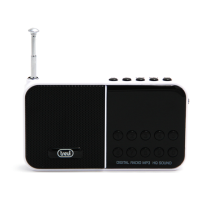
DR 740 SD
8
ENGLISH
SOURCE SELECTION
First press the S key (2) to enter the mode Micro SD / FM RADIO.
RADIO OPERATION
1. Press the S button (2) until the display shows the FM radio frequency .
2. Extend the telescopic antenna (12) for better reception of the stations.
MANUAL SEARCH
Press the buttons for a few seconds SKIP-(3) and SKIP + (4) to perform a manual
search of radio frequencies, the search will stop when issuing a receipt will be stereo.
END SEARCH
Press the SKIP- (3) and SKIP + (4 ) to increase or decrease the frequency of 0.1 MHz.
DIRECT RECALL OF FREQUENCY
1. Use the keypad (9) to tune the desired frequency.
For example, to listen to 93.1MHz frequency type 9 3 1.
AUTOMATIC STORAGE OF STATIONS
To store stations automatically hold for 2 seconds, the PLAY / PAUSE button and
automatically starts scanning.
MANUAL STORAGE OF STATIONS
1. To save a radio station press the button PLAY / PAUSE button and then use the SKIP
keys-(3) and SKIP + (4) to select the preset number you want. Confirm the position
by pressing the button PLAY/PAUSE. The radio station is now saved to the chosen
location. You can save up to 40 radio stations.
2. To recall a preset station number using the numeric keypad.
Note: To get the best FM reception , extend the antenna ( 12). If the reception is not good
otherwise try to adjust the length of the antenna, however the quality of FM reception
depends on the place where the device is placed .
The proximity of TV sets , fluorescent lamps , or other appliances may cause interference in
the reception of radio programs , in this case removed the radio player .
OPERATION MICRO SD
1. Insert the Micro SD memory entrance (10).
2. First press the S button (2) until you see the item SD; wait few seconds for the
external player loads all the files.
3. Playback will start automatically.
4. To insert a pause, press once the PLAY / PAUSE button (5).
5. To release the pause, press a second time the PLAY / PAUSE button (5).
6. To reverse / forward quickly listening to a song, press and hold the SKIP-(3) and
SKIP + (4).
7. To switch to the playback of the previous / next track, press the SKIP-(3) and SKIP + (4).
8. To select a track using the buttons to type the number (11).


 To Next Page