28
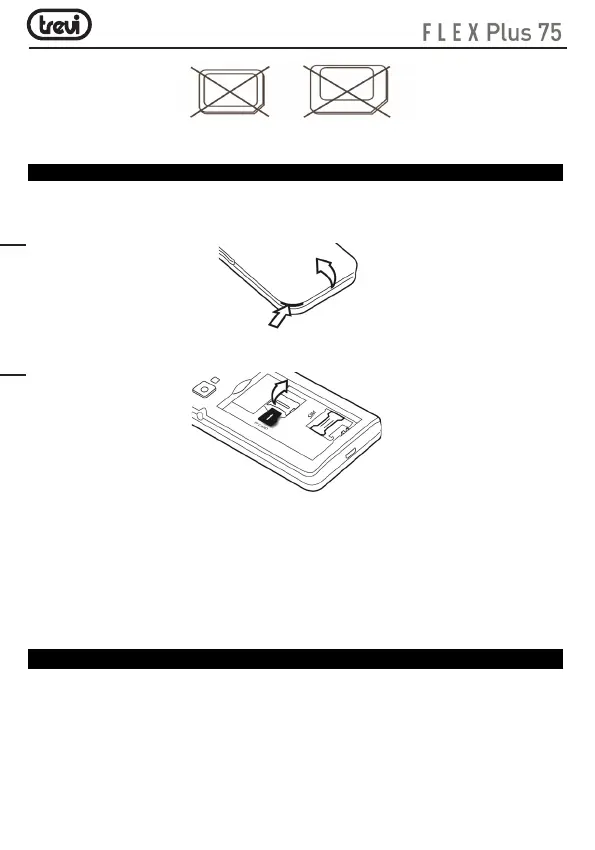
Micro SD card installation
To store photos, videos, and music should insert a micro SD external memory.
• Carefully remove the back cover;
• Insert the micro SD card keeping the surface with the electrical contacts facing down
(display side);
• Replace the back cover.
Notes:
• Some card brands may not be compatible with the phone. The use an incompatible
memory may be damaged or the card memory itself.
• The appliance only supports memory formatted in FAT. If you enter formatted cards
differently the phone will ask you to reformat the memory card.
Battery recharge
CHARGING THROUGH POWER SUPPLY:
1. Turn off the device, connect the Micro USB plug of the supplied cable to the Micro
USB phone (to use the supplied cable only);
2. Connect the USB outlet on the same power supply cable and plug the latter to a standard
wall outlet;
3. The device will switch on to show the battery icon with the charging phase for a few
seconds. To view, at any time, the level of charge just press any key on the phone;
Nano SIM card with adapter
ENGLISH


 To Next Page