MPV 1705 SR
12
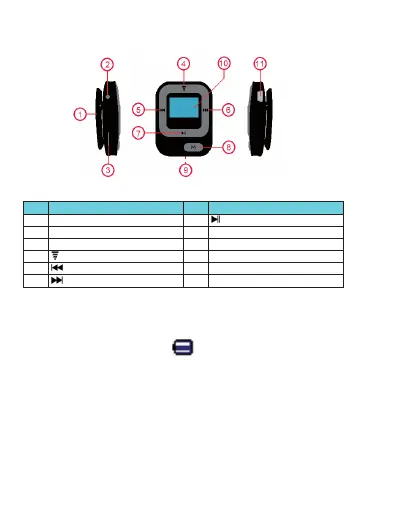
1. Get to know the controls on Player
Item Description Item Description
1 Clip 7
(Play / Pause / Power ON - OFF)
2 Earphone Output Jack (3.5mm Stereo) 8 M (Menu / Enter / Select)
3 Micro SD Memory Card Slot 9
Reset Button (
On the back side)
4
Button (Volume Control)
10 LCD Display
5
(Previous / Fast-Rewind / Tune -)
11 Mini USB Port
6
(Next / Fast-Forward / Tune +)
2. About Player Battery
Player has an internal, non–user-replaceable battery. For best results, the first time you use
player, let it charge for about 2 -3 hours or until the battery status icon in the “Connect” screen
shows that the battery is in full.
Battery is in full
Note: Player continues to use battery power after it’s been turned off, if unit isn’t used for a while,
the battery might need to be charged.
a. Charging the Battery:
You can charge the player battery in two ways:
Connect player to your computer. Or,
Use the USB power charger. (not included)
b. Connection and Charging:
Once you have connected player with computer / power charger, then you will see the
“Connect” screen appear on screen,
English
Micro



 To Next Page