i. Japan Band
To suit your region frequency, choose “Japan Band” to switch the receiving frequency range
to 76MHz – 92MHz. (common for Japan area)
j. Exit
Choose “Exit” to back to radio tune screen.
k. Change Stored Radio Stations From Channel List
Once you have tuned and stored the radio station into channel list by Manual tune / Auto
Search function, and then you can recall them by press or pressing button.
The channel number (CH01 – CH20) will change up from low number when each time you
press button and the stored radio station will change for listening accordingly.
11. Reset
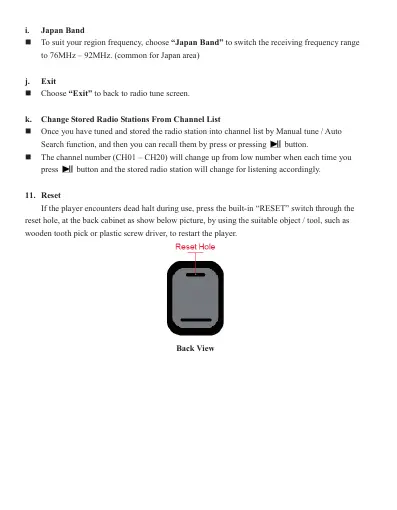
If the player encounters dead halt during use, press the built-in “RESET” switch through the
reset hole, at the back cabinet as show below picture, by using the suitable object / tool, such as
wooden tooth pick or plastic screw driver, to restart the player.
Back View



 To Next Page