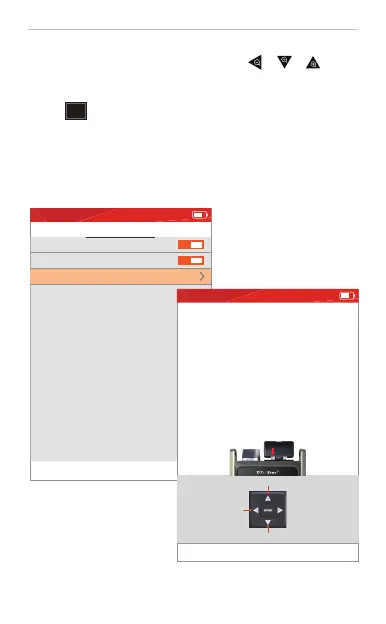
OPM settings
Press key ENTER to edit setting.
Auto λ
Freq. ID
Offset settings
2020-10-01 THU 21:25
S ET TIN G
11
OPM
Connecting the fiber to the OPM port and press “ ”“ ”“ ”buttons
to switch the wavelength 850/1300/1310/1490/1550/1625nm, set reference
value, and check reference value.
Press “ ” to the OPM setting interface.
Auto λ: If ON, then OPM can identify the current wavelength in fiber
automatically.
Freq. ID: Set ON/OFF to identify the frequency or not.
Offset settings: If not too accurate testing, user can do manual calibration by
setting offset value of each wavelength.
Operate according to the prompts.
dBm
-50.000
dB
mW
82.790
-55.540
1310nm
REF:-70.00dBm
Switching
wavelength
View REF
REF setting
Freq:--.--
2020-10-01 THU 21:25


 To Next Page
 Loading...