S ET TI N G M A RK ER
+ E SC =F U L L
EN TE R
SC A N
ES C
> 2s L ED
VFL
SA VE
FIL E
2
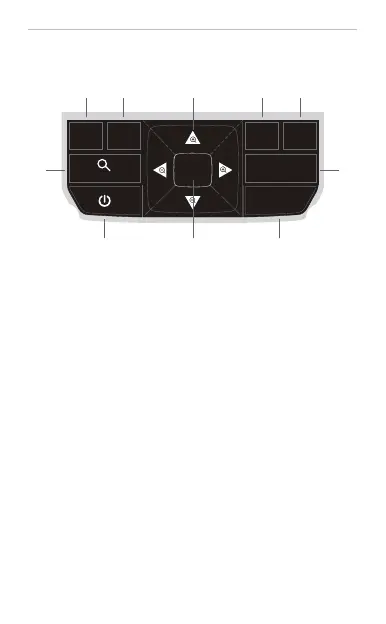
1 —— Press to enter the corresponding measurement setting interface.
2 —— Press to save current testing result or enter into the file list.
3 —— Select the cursor in OTDR testing interface.
4 —— Control VFL ON-GLINT-OFF, and press >2s to turn on/off LED light.
5 —— Zoom in/out the OTDR testing waveform combining with Navigation and ESC buttons
6 —— Long press to turn on/off the device. If OFF, it will pop up “Do you want to power off”
7 —— Press to start the measurement.
8 —— Press to back to previous menu.
9 —— Navigation buttons for selecting operation
10 —— Press to enter the next operation and confirm.
KEYS INTRODUCTION
1 2
5 7
9
106 8
3 4


 To Next Page
 Loading...