10
BEFORE YOU BEGIN
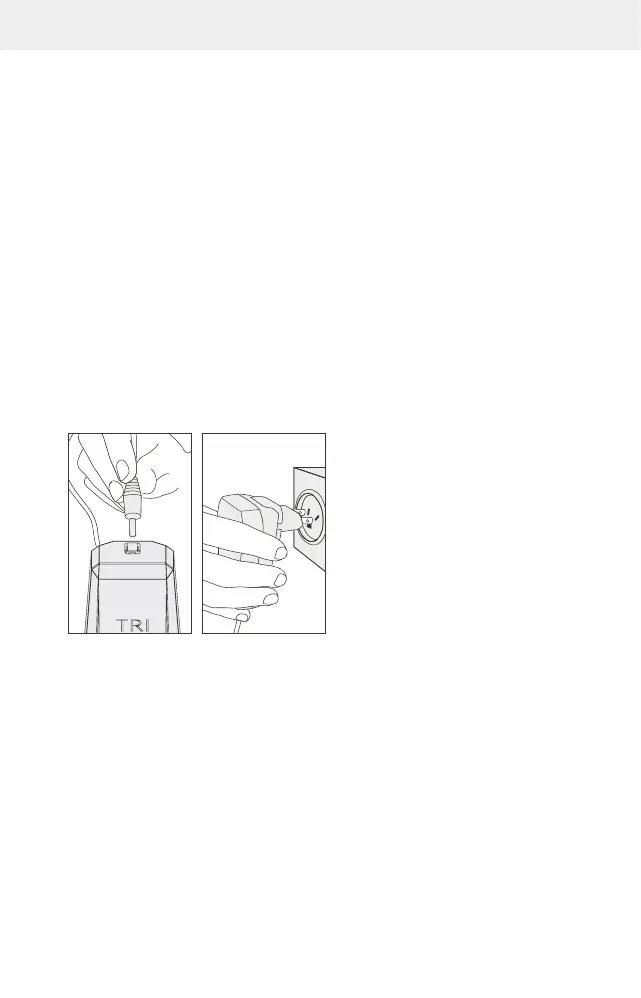
Before using the TriPollar Stop VX2 device, do the following:
1. Open the box containing the device, and remove the device and its power supply.
2. Connect the power supply to the device (FIG.7)
3. Plug the power supply into an electrical outlet (FIG.8)
4. Remove the TriPollar Preparation Gel from its box.
Important: Before using the device for the first time, it is recommended to perform
a patch test 24 hours prior to initial use. To do so, apply a small amount of TriPollar
Preparation Gel to the inner arm and treat the area with the TriPollar Stop VX2 device.
Ensure that the skin does not have a negative reaction to the gel or treatment.
5. Remove the protective cover from the device.
FIG.7 FIG.8



 To Next Page