EasyManua.ls Logo

Tripp Lite DWF2670X - Page 6

Tripp Lite DWF2670X
8 pages
Print Icon
To Next Page IconTo Next Page
To Previous Page IconTo Previous Page
Loading...
6
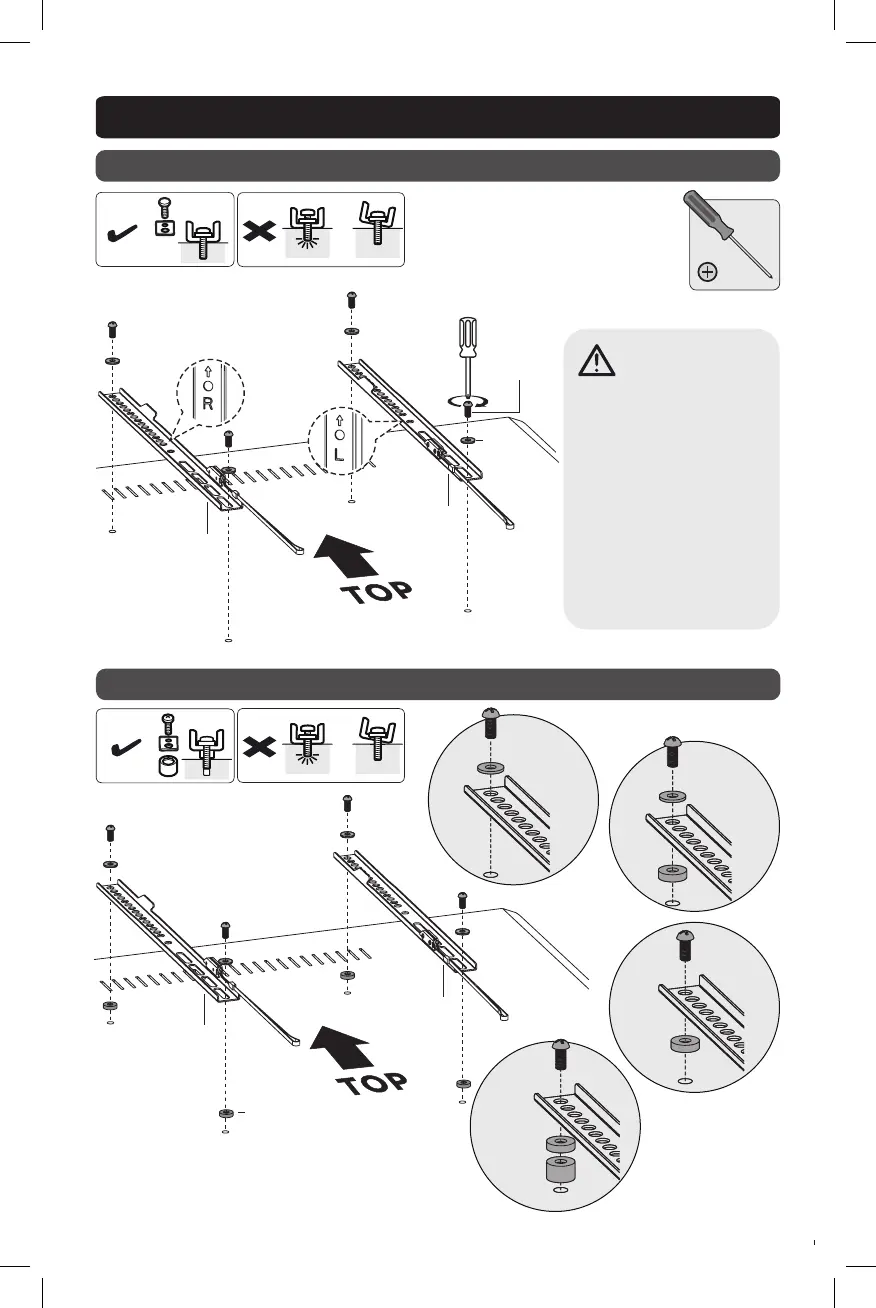
3. Install Adapter Brackets
3-1 For Flat-Back Screen
3-2 For Recessed-Back Screen or to Access A/V Inputs
TV
TV
Washer
M5X14
M6X14
TV
TV
TV
TV
D
D
C
C
Note: Choose
appropriate screws,
washers and spacers
(if necessary)
according to the
type of screen.
Position the
adapter brackets
as close as possible
to the center of
the display.
Screw the adapter
brackets onto the
display. Firmly secure
all screws.
Do not overtighten.
Washer
M6x25
M8x25
Washer
M6x25
M8x25
Small
Spacer
Large
Spacer
M8x45
Small
Spacer
M8x25
OR
OR
OR
Small
Spacer
21-06-207-933E68-EN.indd 621-06-207-933E68-EN.indd 6 7/7/2021 8:50:28 AM7/7/2021 8:50:28 AM

Related product manuals