1481
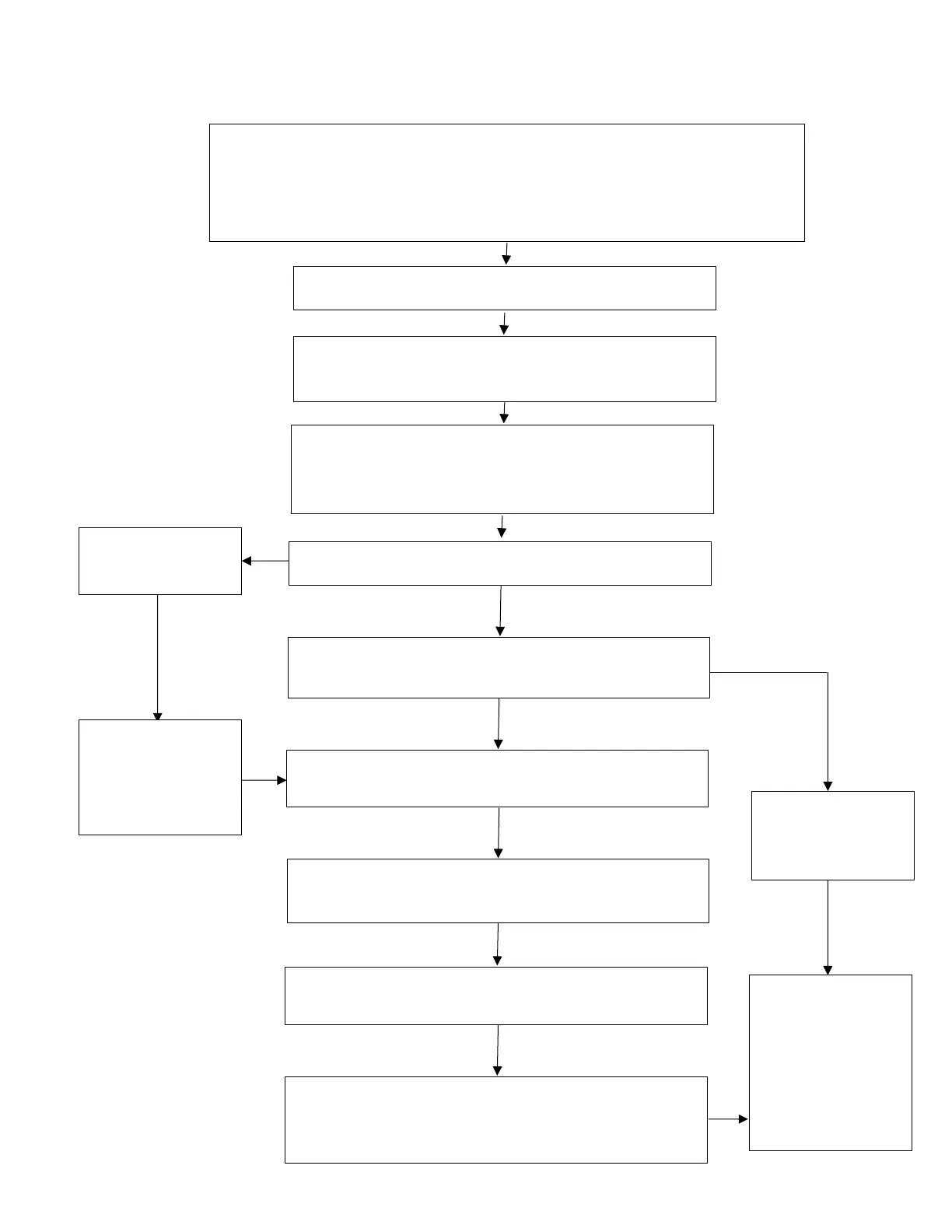
Instrument Calibration Download Flow Chart
Position a paired key in range.
For US markets only, turn the ignition master switch ON.
Press the Power ON/OFF button to turn the motorcycle power On.
Ensure the engine Start/Stop switch is in the STOP (OFF) position.
Connect the Triumph Diagnostic Tool.
From the main menu, navigate to DOWNLOAD,
then INSTRUMENT DOWNLOAD.
Enter the password, then select Automatic
Model Selection. The password can be found on
TriumphOnline.
Click Start. Is the model detected correctly?
Select Manual
Model Selection.
Is the current calibration up to date? Refer to
the calibration report on TriumphOnline.
Select the correct calibration for your region.
Click Next.
correct model
and VIN range
Check the selected calibration is correct for your
model and region. Click Confirm.
No further
action required.
Click Cancel.
Allow the download to complete. This should
take approximately eight minutes.
Click Finish when the download has completed.
Check all ECMS for stored DTCs and erase as






 To Next Page