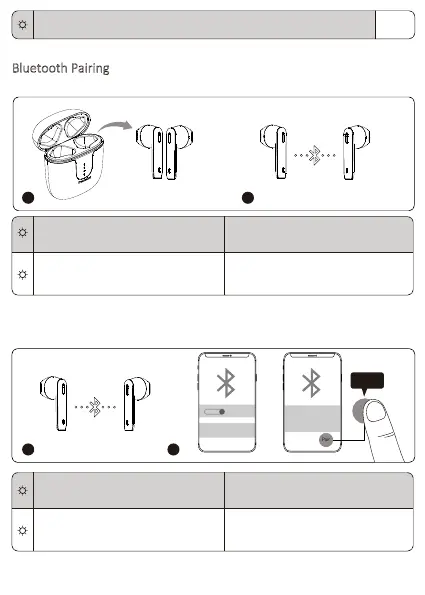
Bluetooth Pairing
. True ireless Stereo connecon
2. Bluetooth connecon
The earphones will enter pairing mode when they are turned on.
Flashing white True Wireless Stereo pairing mode
lashing white Le earphone
oes off Right earphone
True ireless Stereo connecon is
successful
ffFlashing red for 1 second (Earphones’ indicator)
1 2
lashing white Le earphone
oes off Right earphone
Pairing mode
oes off Both earphones Connected to a device
21
ON
Onyx Ace
Bluetooth Pairing Request
“Headset” would like to pair
with your iPhone
Cancel Pair
Pair
03


 To Next Page