03
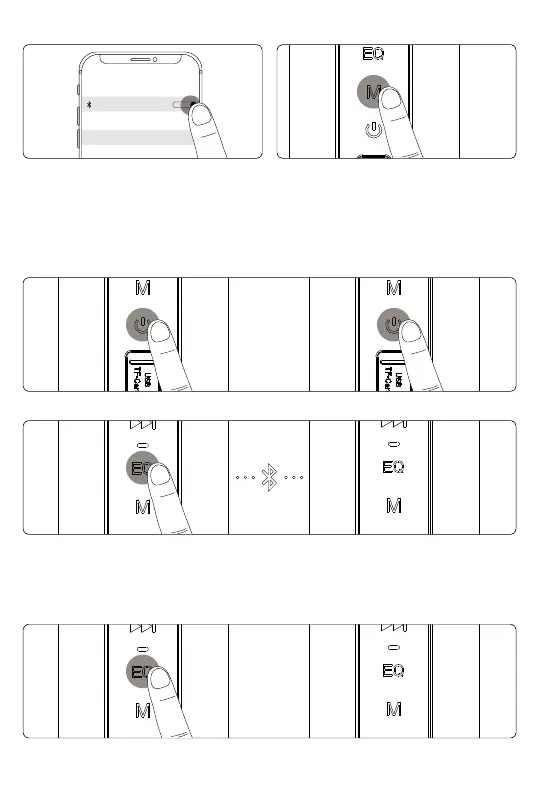
2. Bluetooth Connection & Disconnect
3. Pair Two T6 Plus Upgraded Edition Speakers
7XUQWZRVSHDNHUVRQDQGFRQȴUPWKH\UHQRWSDLUHGDQ\%OXHWRRWKGHYLFHV
+ROGWKH(4EXWWRQIRUVHFRQGVRIHLWKHUVSHDNHU
After two speakers have paired with each other successfully, you will hear a sound
prompt and the indicator lights will go on yellow.
4. Disconnect Two Speakers
+ROGWKH(4EXWWRQIRUVHFRQGVDJDLQWRGLVFRQQHFWWZRVSHDNHUVIURPHDFKRWKHU
3s
Bluetooth
MY DEVICES
T6 Plus Upgraded Edition
Not Connected
7XUQRQWKHVSHDNHUDQG\RXUGHYLFHV
%OXHWRRWKVHWWLQJVVHDUFKIRU
73OXV8SJUDGHG(GLWLRQ
then tap to connect.
+ROGWKH0EXWWRQIRUVHFRQGVWR
disconnect Bluetooth pairing.

 To Next Page
 Loading...