9 10
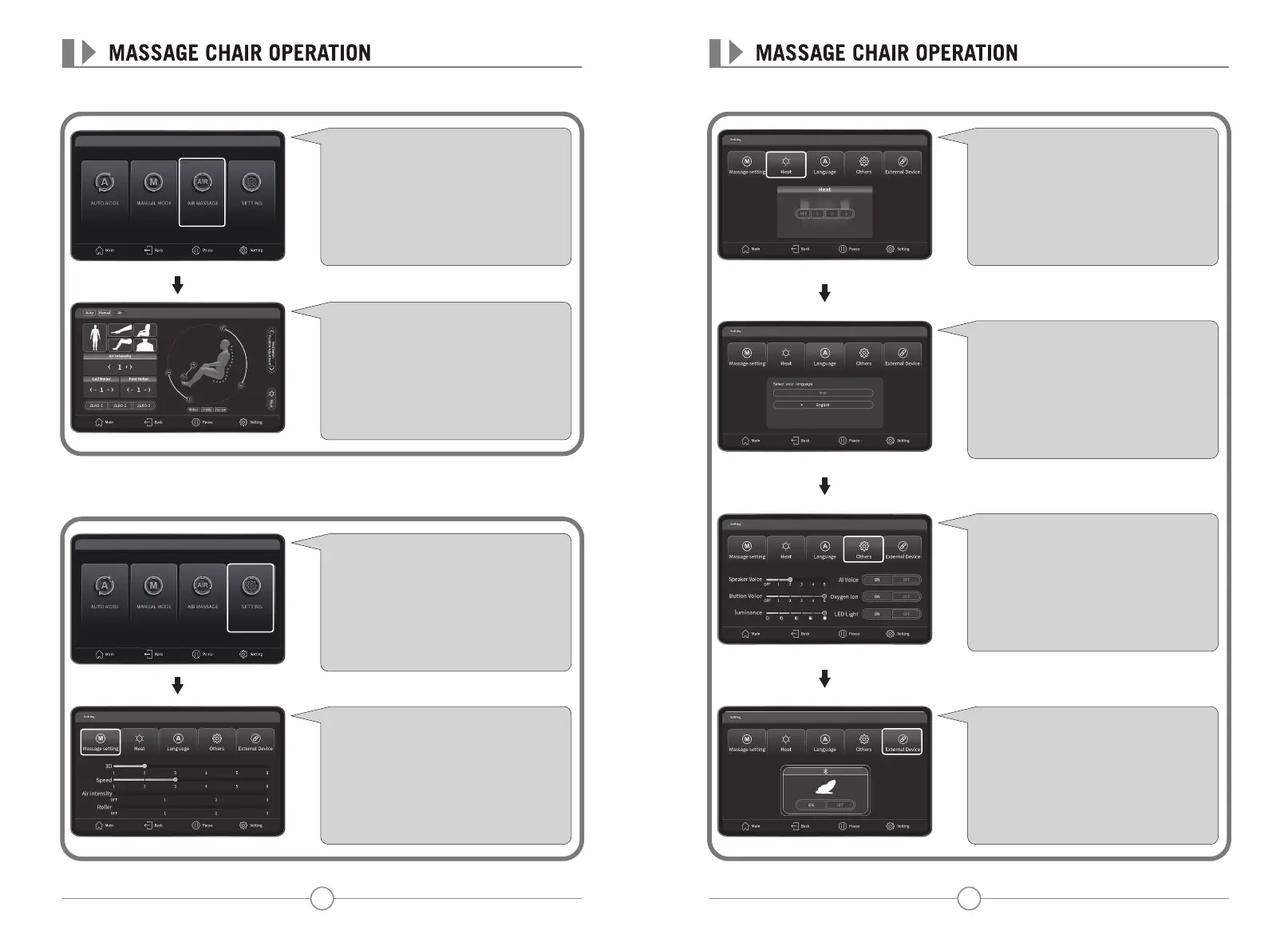
Air Interface◉
Settings Interface◉
Click "Air Massage" to enter the interface of
airbags massage.
On the Air Pressure interface, you can select
body parts: arm, back, Leg, shoulder for
pressure massage, at the same time these
functions are adjustable: air intensity, calf
massage, sole massage, heating and other
functions.
Press "Back" to return to the upper menu.
Click "Setting" to enter the setting
interface.
Under the "Settings" interface, select
"Massage Settings" to adjust 3D, massage
speed, air intensity, roller and other
functions.
Press "Back" to return to the upper menu.
On the Settings interface, select Heat to
enable the function, Or select 1-3 heating
levels.
Press "Back" to return to the upper menu.
On the Settings interface, click "External
Device" for selecting Bluetooth function.
Press "Back" to return to the upper menu.
On your phone Bluetooth list, choose the
model "Tru Iconic" to do the pairing.
On the Settings interface, select Others to
adjust the volumn, key tone, screen
brightness.
Press "Back" to return to the upper menu.
On the Settings interface, select Language to
switch to a variety of languages.
Press "Back" to return to the upper menu.


 To Next Page
 Loading...