4
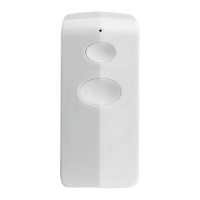
AYCT-102 REMOTE CONTROL
EN
1. Channel switch
Slide the channel switch to I, II, III or IV to access 16
dierent channels (4 x
1 2 3 4
).
2. Control 1 Trust Smart Home receiver per
channel
To control receivers individually, assign a seperate channel
(
1 2 3
and
4
) to each receiver. Read the receivers
manual for the code learning procedure.
3. Control multiple Trust Smart Home receivers
per channel
To control several receivers simultaniously, assign the
same channel (for example
1
) to those receivers. Read
the receivers manual for the code learning procedure.
4. Group function
Assign the
G
button to multiple receivers to switch a
group of receivers ON/OFF simultaniously (no dimming).
Read the receivers manual for the code learning
procedure. The
G
button can always be used, regardless
of the channel switch setting (I, II, III or IV).
5. Manual operation of a Trust Smart Home on/
o receiver
A
Press ON to switch the receiver on.
B
Press OFF to switch the receiver o.
6. Manual operation and dimming with a Trust
Smart Home transmitter
A
Press ON once to switch the receiver on.
B
Press ON again to activate the dim-mode. The light will
slowly dim up and down.
C
Press ON a third time to set the desired light intensity.
D
Press OFF to switch the receiver o.
The receiver will return to the last light level when
switched on again.
7. Manual operation of a Trust Smart Home
receiver for electric screens
A
Send an ON-signal to raise the screen.
B
Send an ON-signal again to stop.
C
Send an OFF-signal to lower the screen.
D
Send an OFF-signal again to stop.
Read the receivers manual to reverse the direction of the
screen, if needed.
8. Replace transmitter battery
A
Open the battery compartment by screwing it open.
B
Place a new 3V CR2032 lithium battery. The polarity
should match the symbols on the holder.
C
Close the battery compartment.


 To Next Page
 Loading...