TST-770 WSD Full Line Manual-RevA
© 2021 Truck System Technologies and Pressure Systems International Inc. All Rights Reserved Worldwide.
support@TSTtruck.com (770) 889-9102 M-F 9-8pm, Sat 9-2pm EST
Page 7
MAIN SCREEN
Remove protective lm from Display by lifting the tab in the upper right corner.
Slide power slide switch to ON position.
Startup Screen will appear after ~5 seconds, followed by the Settings Icons Screen
or, if sensor(s) are already programmed, the Power Unit/Trailer Main Screen will appear
after approximately 5 seconds.
If no sensors are paired to the Display, the Settings Menu Screen 1 will change to the
Power Unit/Trailer Main Screen after approximately 1 minute, 30 seconds.
Note: When the display receives the paired sensor information, the corresponding pressure
and temperature data will be displayed on the
Power Unit/Trailer Main Screen
.
Settings Menu Screen 1
(if no sensors are programed)
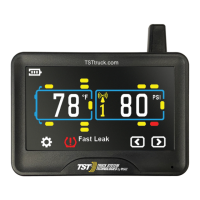
Power Unit/Trailer Main Screen
(appears after 1 minute, 30 seconds)
GPS Interface Screen
(left and right arrows bring up GPS)
Power Unit/Trailer Main Screen
(if sensors already programed)
Startup Screen
Touch or to switch between Power Unit/Trailer Main Screen and
GPS Interface Screen (this is not a navigation tool). Please allow
up to 15 minutes for the
GPS to initialize the rst time
.
Back To TABLE OF CONTENTS


 To Next Page
 Loading...