CXT-200 Corner Multi-Funtional Trainerwww.tustutness.com
18
Step 6
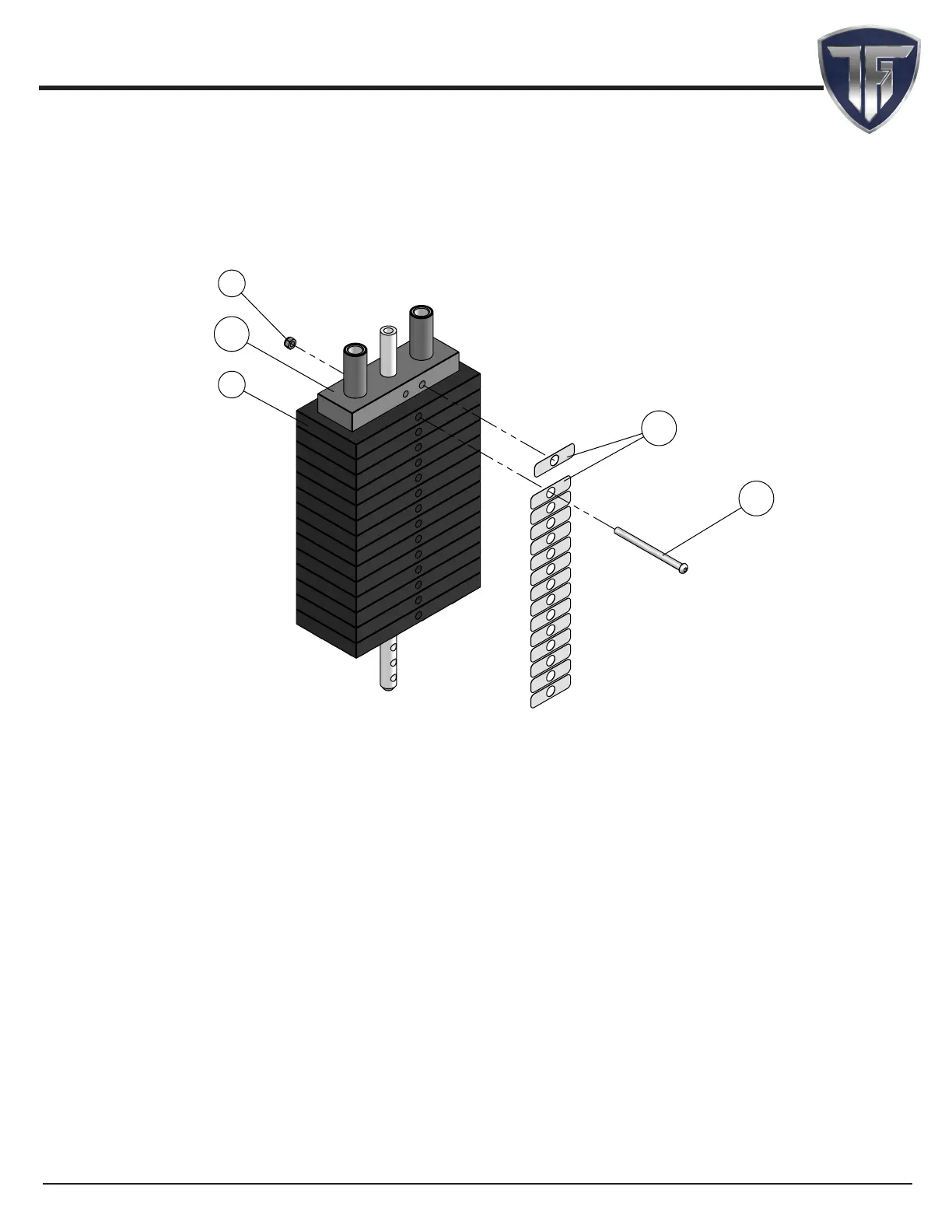
Weight stack label and lubrication instructions
1� Wipe front surface of weight stack with rubbing alcohol and wipe dry�
2� Peel o back sheet (adhesive side) from label (#123) and make sure that the label remains
attached to the application tape�
3� Line up left edge of label sheet with outside edge of weight holes�
4� Line up the rst label to hole on top plate�
5� Make sure label is straight and slowly press into place�
6� Gently remove application tape and rub each label rmly against the weight stack�
7� Allow labels to stand for 2 days to allow adhesive to cure fully�
8� Open the lube package provided and apply a thin lm of lubricant around the rst 3 inches
of the guide rods above the top plate�
9� After the cables are installed, do a set of reps to spread the lubricant thoroughly�
10� Bolt the rst weight plate with specied hardware as shown above� This is to counter
balance the oating pulley brackets and the attachments so you can easily select weight�
NOTE:
1� Top plate label goes on hole o center as shown� Label will
cover hole on center�
2� After applying label, bolt the rst weight plate to top plate�
3� This applies to both 150 Lbs and 200 Lbs weight stacks
100
98
124
112
35



 To Next Page