Battery Change
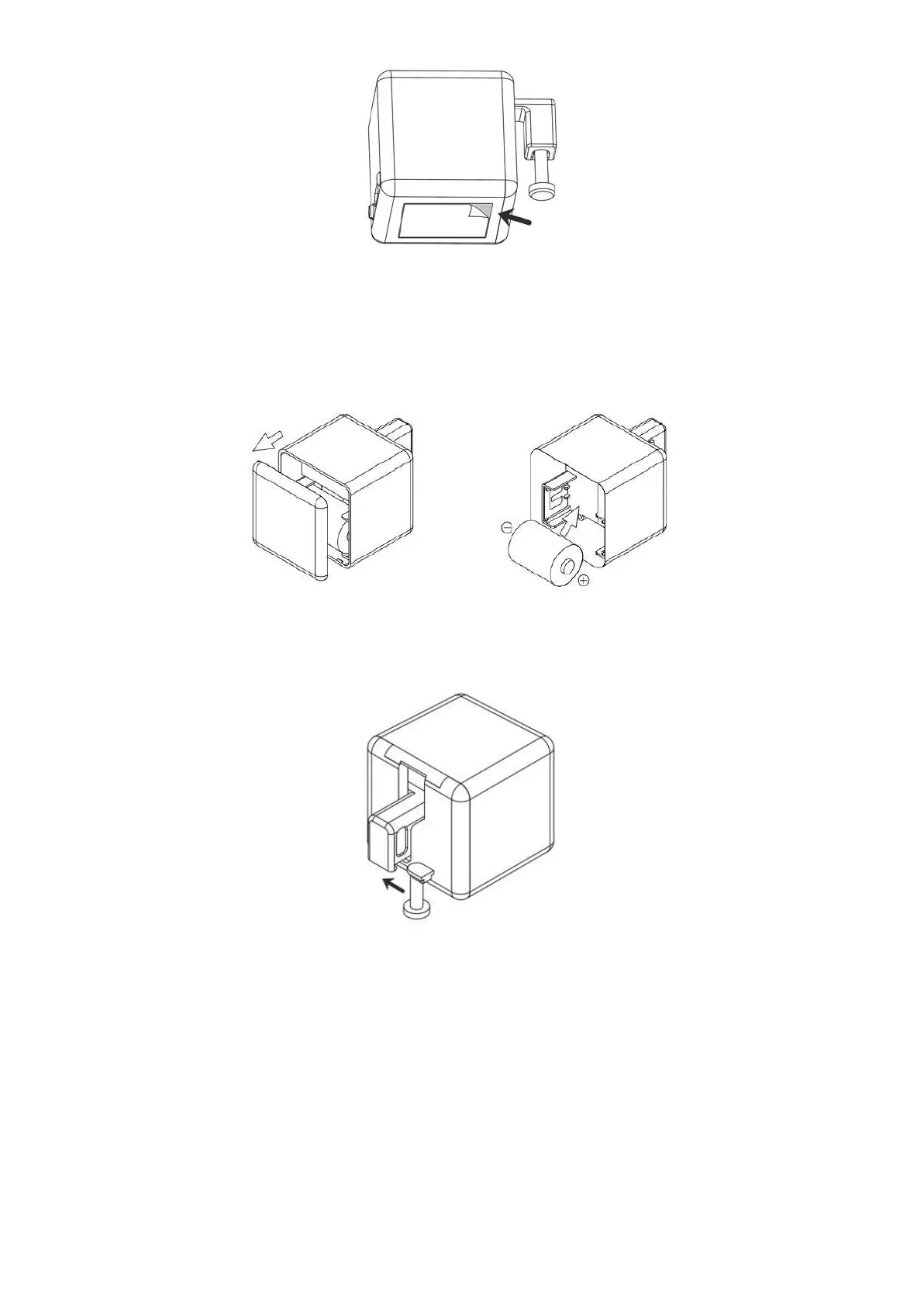
Fingerbot works with a replaceable CR2 battery. If its arm does not move as expected, please replace the battery.
To replace the old battery, please open the case from behind and make sure the new one is installed in the right direction.
Robotic Arm Extension
With the modular design, the Fingerbot’s arm is replaceable in order to meet different needs in diverse situations. We designed three types of Fingerbot
arms and included them in the Fingerbot ToolPack (needs to be purchased separately). Also, we provide free 3D-printing templates for you to design
customized Fingerbot arms. Visit www.adaprox.io to download the digital files.
Warnings
The product is not waterproof. Do not install it on an underwater appliance.
The product contains a battery, therefore prohibited in the humid, high-temperature environment.
Do not hinder the movement of the Fingerbot's arm when it is working. Otherwise it may cause the arm to fall off and damage the motor inside the
Fingerbot.
Specifications
Dimensions: 34.5 x 34.5 x 34.5 mm
Weight: 38g
Wireless protocol: Bluetooth Low Power 4.2
Battery type: CR2
Stall torque: 2.0 kgf·cm
Maximum arm movement: 12 mm


 To Next Page
 Loading...