EasyManua.ls Logo

TUYA QS-WIFI-S05 - User Manual

TUYA QS-WIFI-S05
16 pages
Print Icon
To Next Page IconTo Next Page
Loading...
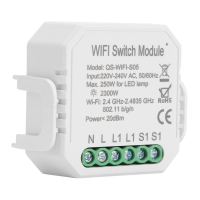
1 Gang Wi-Fi
Switch Module(BK)
QS-WIFI-S05(BK)
INSTRUCTION MANUAL
Global international operation Whenever & Wherever
You are,All-in-one Mobile App
Anywhere
APP
APP
Schedule timer Voice control-work
with google home
Voice control-work
with Amazon Alexa
Device Sharing
Apps
APP
Router Voice control Ordinary Switch
Inhouse local operation
INSTALLATION
Warnings:
1.
electrician in accordance with local regulations.
2. Keep the device out of reach of children.
3. Keep the device away from water , damp or hot
environment.
4. Install the device away from strong signal sources
such as microwave oven that may cause signal
interruption resulted to abnormal operation of the
device.
5. Obstruction by concrete wall or metallic
materials may reduce the effective operation
range of the device and should be avoided.
6. Do NOT attempt to disassemble,repair or modify
the device.
Wiring Instructions and Diagrams
FAQ
Scan the QR code to download Tuya Smart App, or
you can also search keyword “Tuya Smart” at App
Store or Googleplay to download App.
IOS APP / Android APP
APP USER MANUAL
MANUAL OVERRIDE
The switch module terminal reserves the access of
manual override function for the end-user to switch on/off.
Switch on/off for permanent on/off function.
Notes:
1) Both the adjustment on App and switch can overwrite
each other, the last adjustment remains in memory.
2) The App control is synchronized with the
manual switch.
1.Turn off the power supply before carrying out any
electrical installation work.
.margaid gniriw eht ot gnidrocca seriw tcennoC .2
.xob noitcnuj eht otni eludom eht tresnI .3
eludom hctiws wollof dna ylppus rewop eht no nruT .4
configuration instructions.
Notes: Take your smartphone close to the switch
sure you have min. 50% Wi-Fi signal.
TECHNICAL SPECIFICATIONS
Product type WIFI Switch Module
Voltage 100-240V AC
Max. load 2300W/250W for LED
Operation
frequency
2.4GHz - 2.4835GHz
WIFI
Operation temp. -10ºC - +40ºC
Case temp. Tc: +80ºC (Max.)
Operation range 200 m
Dims (WxDxH) 46x46x18 mm
IP rating IP20
Warranty
2 years
Q1: What should I do if I can’t configure the switch
module?
a. Please check whether device is powered on.
b. Make sure your mobile and switch module
are under the same 2.4 Ghz WIFI network.
c. Whether it’s in good internet conditions.
.tcerroc si ppA ni deretne drowssap eht erus ekaM .d
e. Make sure the wiring is correct.
Q2: What device can be connected to this Wi-Fi switch
module?
Q3: What happens if the WIFI goes off?
Most of your household electrical appliances can be,
such as lamps, laundry machine, coffe maker, etc.
You can still control the device connected the switch
module with your traditional switch and once WIFI is
active again the device connected to module will
connect automatically to your WIFI network.
Q4: What should I do if I change the WIFI network or
change the password?
You have to re-connect our Wi-Fi switch module to the
new Wi-Fi network accordingly as per the App User Manual.
Q
5: How do I reset the device?
1. Switch on/off for 5 times until the indicator light
flash quickly.
2. Power on/off for 5 times until the indicator light
flash quickly.
Mounting Clip
S1
S1
L1
L1
L
N
L
L1
N
L1
S1
S1
L N
Indicator Light
with mounting clip without mounting clip
50mm
46mm
22.5mm
18mm
46mm
46mm
Indicator Light
7.Install the air circuit breaker in front of the switch
module.

Question and Answer IconNeed help?

Do you have a question about the TUYA QS-WIFI-S05 and is the answer not in the manual?

Overview

This document describes a 1 Gang Wi-Fi Switch Module, model QS-WIFI-S05(BK), designed for smart home automation.

Function Description

The Wi-Fi Switch Module allows users to control electrical appliances remotely via a mobile app or voice commands. It integrates with existing traditional switches, offering both manual and smart control options. The module enables scheduling, voice control through Google Home and Amazon Alexa, and device sharing. It supports both global international operation via an all-in-one mobile app and in-house local operation.

Important Technical Specifications

  • Product type: WIFI Switch Module
  • Voltage: 100-240V AC
  • Max. load: 2300W/250W for LED
  • Operation frequency: 2.4GHz - 2.4835GHz WIFI
  • Operation temp.: -10°C - +40°C
  • Case temp.: Tc: +80°C (Max.)
  • Operation range: ≤ 200 m
  • Dims (WxDxH): 46x46x18 mm
  • IP rating: IP20
  • Warranty: 2 years
  • Certificates: CE ROHS

The module's dimensions are 46mm (width) x 46mm (depth) x 18mm (height) without the mounting clip. With the mounting clip, the width becomes 50mm and the height becomes 22.5mm.

Usage Features

Installation:

  1. Installation must be carried out by a qualified electrician in accordance with local regulations.
  2. Turn off the power supply before any electrical installation work.
  3. Connect wires according to the provided wiring diagram.
  4. Insert the module into the junction box.
  5. Turn on the power supply and follow switch module configuration instructions.
  6. Install an air circuit breaker in front of the switch module.

Manual Override: The switch module terminal reserves access to a manual override function for the end-user to switch on/off. Switching on/off provides a permanent on/off function. Both adjustments made on the App and the physical switch can overwrite each other, with the last adjustment remaining in memory. The App control is synchronized with the manual switch.

App Configuration:

  1. Download the "Tuya Smart" App by scanning the QR code or searching in the App Store/Google Play.
  2. Register or log in to your account using your mobile number or e-mail address.
  3. After wiring, press the traditional switch to turn ON/OFF for 5 times (ensure a sufficient time interval) until the indicator light flashes for pairing mode.
  4. Open Bluetooth on your mobile phone, then open the App. Select "+" on the top right, then click "Go to add" when "Devices to be added" appears. (The device can still be searched without Bluetooth, but it will be slower).
  5. Ensure your smartphone and Wi-Fi Switch are on the same 2.4GHz Wi-Fi network. Choose the devices to be added, click "+", enter the Wi-Fi name and password, and confirm.
  6. Keep your mobile phone and device as close as possible during pairing. The pairing process should finish quickly.
  7. Once paired, the Wi-Fi switch will be shown on the App.
  8. Connect to Amazon Alexa or Google Assistant for voice control, or share devices with family and friends.
  9. Enjoy smart home automation for lighting control via the mobile app or voice control.

Troubleshooting (FAQ):

  • Cannot configure the switch module:
    • Check if the device is powered on.
    • Ensure mobile and switch module are on the same 2.4GHz Wi-Fi network.
    • Verify good internet conditions.
    • Confirm the password entered in the App is correct.
    • Check if the wiring is correct.
  • Compatible devices: Most household electrical appliances such as lamps, laundry machines, coffee makers, etc.
  • WIFI goes off: You can still control the device with your traditional switch. Once Wi-Fi is active again, the device will automatically reconnect.
  • Changing WIFI network or password: Re-connect the Wi-Fi switch module to the new Wi-Fi network as per the App User Manual.
  • Resetting the device: Switch on/off for 5 times until the indicator light flashes quickly, or power on/off for 5 times until the indicator light flashes quickly.

Maintenance Features

  • Keep the device out of reach of children.
  • Keep the device away from water, damp, or hot environments.
  • Install the device away from strong signal sources (e.g., microwave ovens) to prevent signal interruption and abnormal operation.
  • Avoid obstruction by concrete walls or metallic materials, as these can reduce the effective operation range.
  • Do NOT attempt to disassemble, repair, or modify the device.

TUYA QS-WIFI-S05 Specifications

General IconGeneral
BrandTUYA
ModelQS-WIFI-S05
CategoryWireless Router
LanguageEnglish

Related product manuals