connection modes
Twinkly usa il Bluetooth solo per il processo di
installazione. Per il funzionamento è necessaria la
connessione Wi-Fi. Puoi usare:
A. Connessione di rete Wi-Fi domestica (consigliato):
Connettiti al tuo WiFi di casa / ucio dall’elenco delle
reti disponibili.
B. Connessione Wi-Fi diretta:
Seleziona “Twinkly_xxxxxx” WiFi dall’elenco delle reti
disponibili. Password: Twinkly2019 (NOTA: in questo
caso sul tuo telefono non sarà disponibile Internet)
Twinkly utilise Bluetooth pour le processus d’installation
uniquement. Une connexion Wi-Fi est requise pour le
fonctionnement. Vous pouvez utiliser:
A. Connexion réseau Wi-Fi domestique (conseillé):
Connectez-vous avec le WiFi de votre domicile / bureau
à partir de la liste des réseaux disponibles.
B. Connexion Wi-Fi directe:
Sélectionnez «Twinkly_XXXXXX» WiFi dans la liste des
réseaux disponibles. Mot de passe: Twinkly2019
(NOTE: Internet sur votre téléphone ne sera pas
disponible dans ce cas)
conn ecti on modes / moda lità di co nnes sion e / mod es de c onne xion /
ansc hlus smod i / modo s de con exió n / verb indi ngsm odi / yh teys tila t
/ t ilsl utni ngst ilst ande / anslu t nin g slä g en / t ilko blin gsmo duse r /
teng isti llin gar / na čini pov ezav e / reži my p ripo jeni a / r ežim y př ipoj ení /
csat lako zási m ódok / mo duri de c onec tare / tryby połą czeń / pе жими
підк люче ння / pе жимы под ключ ения
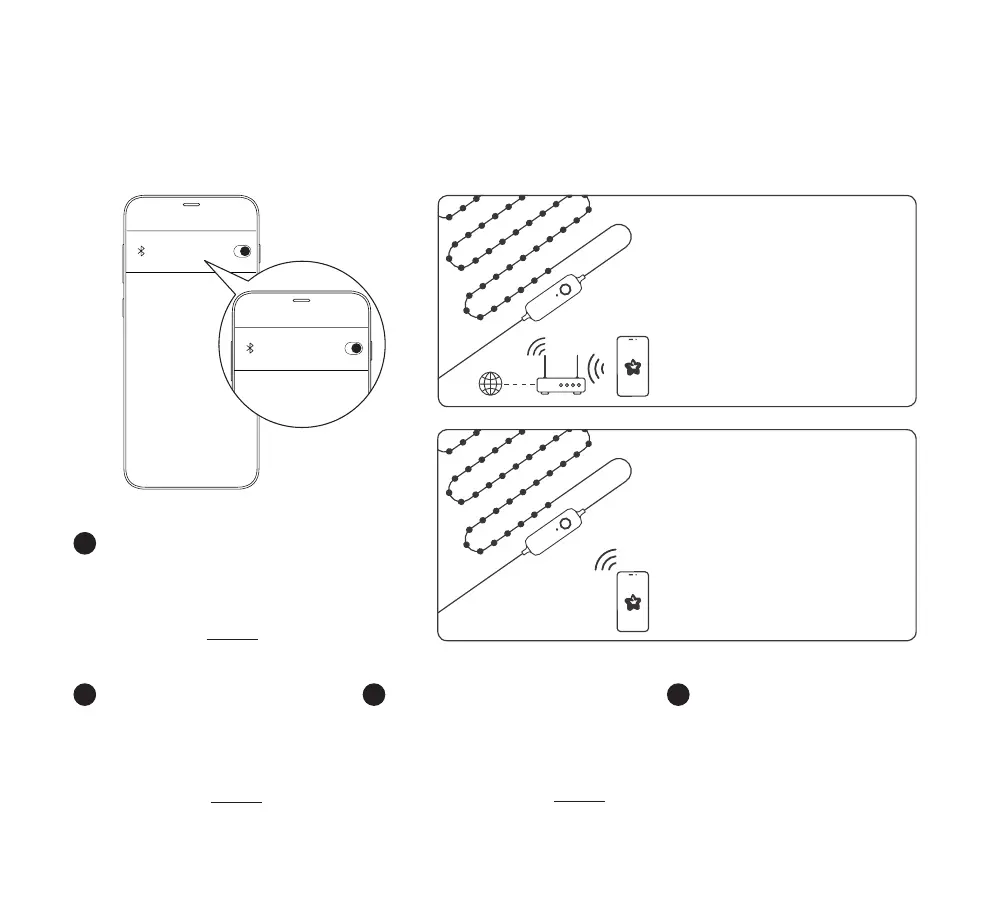
Twinkly uses Bluetooth for the setup process only. Wi-Fi
connection is required for operation. You can use:
A. Home Wi-Fi network connection (recommended):
Connect with your home/oce WiFi from the list of
available networks.
B. Direct Wi-Fi connection:
Select “Twinkly_xxxxxx” WiFi from the list of available
networks. Password: Twinkly2019
(NOTE: the internet on your phone will not be
available in this case)
Twinkly verwendet Bluetooth nur für den
Einrichtungsvorgang. Für den Betrieb ist eine WLAN-
Verbindung erforderlich. Sie können verwenden:
A. Heim-Wi-Fi-Netzwerkverbindung (empfohlen):
Stellen Sie über die Liste der verfügbaren Netzwerke
eine Verbindung zu Ihrem Heim- / Büro-WLAN her.
B. Direkte Wi-Fi-Verbindung:
Wählen Sie „Twinkly_xxxxxx“ WiFi aus der Liste der
verfügbaren Netzwerke. Passwort: Twinkly2019
(HINWEIS: In diesem Fall ist das Internet auf Ihrem
Telefon nicht verfügbar.)
EN
IT FR DE
Bluetooth
Bluetooth
A. HOME WI-FI NETWORK CONNECTION
CONNESSIONE RETE WI-FI DOMESTICA / CONNEXION
RÉSEAU DOMESTIQUE WI-FI / HOME WI-FI-NETZW-
ERKVERBINDUNG / CONEXIÓN DE RED WI-FI HOME /
HOME WI-FI-NETWERKVERBINDING / HOME WI-FI-NET-
VÆRKSFORBINDELSE / HEM WI-FI-NÄTVERKSANSLUT-
NING / HJEMME-WI-FI-NETTVERKSTILKOBLING / HOME
WI-FI NETTENGING / HOME WI-FI OMREŽNA POVEZAVA /
DOMOV PRIPOJENIE SIETE WI-FI / HOME PŘIPOJENÍ K SÍTI
WI-FI / OTTHONI WI-FI HÁLÓZATI KAPCSOLAT / HOME
CONEXIUNE LA REȚEA WI-FI / POŁĄCZENIE SIECIOWE WI-
FI HOME / ГОЛОВНА ПІДКЛЮЧЕННЯ ДО МЕРЕЖІ WI-FI /
ДОМАШНЕЕ ПОДКЛЮЧЕНИЕ К СЕТИ WI-FI
B. DIRECT Wi-Fi CONNECTION
CONNESSIONE WI-FI DIRETTA / CONNEXION WI-FI DI-
RECT / DIREKTE WLAN-VERBINDUNG / CONEXIÓN WI-
FI DIRECTA / DIRECTE WI-FI-VERBINDING / DIREKTE
WI-FI-FORBINDELSE / DIREKT WI-FI-ANSLUTNING /
DIREKTE WI-FI-TILKOBLING / BEIN WI-FI TENGING
/ NEPOSREDNA POVEZAVA Z OMREŽJEM WI-FI /
PRIAME WI-FI PRIPOJENIE / PŘÍMÉ WI-FI PŘIPOJENÍ
/ KÖZVETLEN WI-FI KAPCSOLAT / CONEXIUNE WI-
FI DIRECTĂ / BEZPOŚREDNIE POŁĄCZENIE WI-FI /
ПРЯМЕ ПІДКЛЮЧЕННЯ ДО МЕРЕЖІ WI-FI / ПРЯМОЕ
ПОДКЛЮЧЕНИЕ WI-FI


 To Next Page
 Loading...