
 Need help?
Do you have a question about the tws M7S and is the answer not in the manual?
Prepare the earbuds and charging case by selecting earcaps and charging them before initial use.
Connect the charging case to a power source via cable or wirelessly. Charge earbuds by placing them in the case.
Properly wear earbuds for comfort and learn how to power them on/off manually or automatically.
Connect the earbuds to your phone via Bluetooth, including troubleshooting steps for automatic pairing issues.
Learn to use voice assistant, answer/reject calls, control music playback, and adjust volume using earbud touch controls.
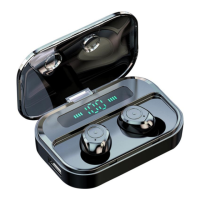
This document describes the TWS M7S Earphones with an LED Charging Case, providing details on their specifications, usage, and features.
The TWS M7S Earphones are wireless earbuds designed for audio playback and calls, featuring a compact design and a portable charging case with an LED display. The earbuds are equipped with touch controls for various functions and are designed for comfortable wear.
It is recommended to select the earcaps that fit your ear, attach them to the earbuds, and then place the earbuds back into the charging case. For optimal performance and longevity, it is advised to fully charge both the earbuds and the charging case before the initial use or after a prolonged period of disuse.
The charging case can be charged using the provided charging cable by connecting it to a PC or a compatible charging adapter. Additionally, the charging case supports wireless charging with a wireless charger. During charging, the digital display on the case will flash. Once fully charged, the display will show "100," indicating that it should be disconnected from the power supply. It is important to use a 5V and 1A power adapter for charging the case or utilize a USB port on a PC/Laptop.
To charge the earbuds, place them inside the charging case and close the lid. Ensure the charging case is fully charged beforehand. While the earbuds are charging, both the left and right indicators will flash red. Once the earbuds are fully charged, all indicators will turn off, and the charging case will automatically power off.
For the best fit and comfort, wear the earbuds correctly according to the "L" (left) and "R" (right) symbols located on the back of the earbuds. Align the earpiece with your ear canal and rotate it to find the most comfortable angle.
The earbuds will automatically power on when removed from the charging case. If the charging case is not available, they can be manually powered on by pressing and holding the touchscreen of both earbuds for two seconds until the blue and red indicator lights begin to flash alternately.
The earbuds will automatically power off when placed back into the charging case. If the charging case is not nearby, disconnecting your phone's Bluetooth will cause the earbuds to automatically turn off after 5 minutes. Alternatively, they can be manually powered off by holding both touchscreens of the earbuds for 6 seconds, at which point a red light will illuminate to indicate they are powered down.
To pair the earbuds, remove them from the charging case. They will automatically power on and pair with each other. To connect them to your phone, enable Bluetooth on your device, search for available devices, and select "TWS M7." Once paired, the earbuds will automatically connect to the last used device upon power-on for subsequent uses.
If automatic pairing fails, follow these steps:
The device is rated IPX7 for water resistance, indicating it can withstand immersion in water up to 1 meter for 30 minutes. This suggests a degree of protection against sweat and light splashes, making it suitable for various activities. However, specific cleaning or maintenance instructions are not detailed in this document. It is generally advisable to keep the charging contacts clean and dry to ensure proper charging.
 General
| Brand | tws |
|---|---|
| Model | M7S |
| Category | Wireless Headphones |
| Language | English |

 To Next Page
