7
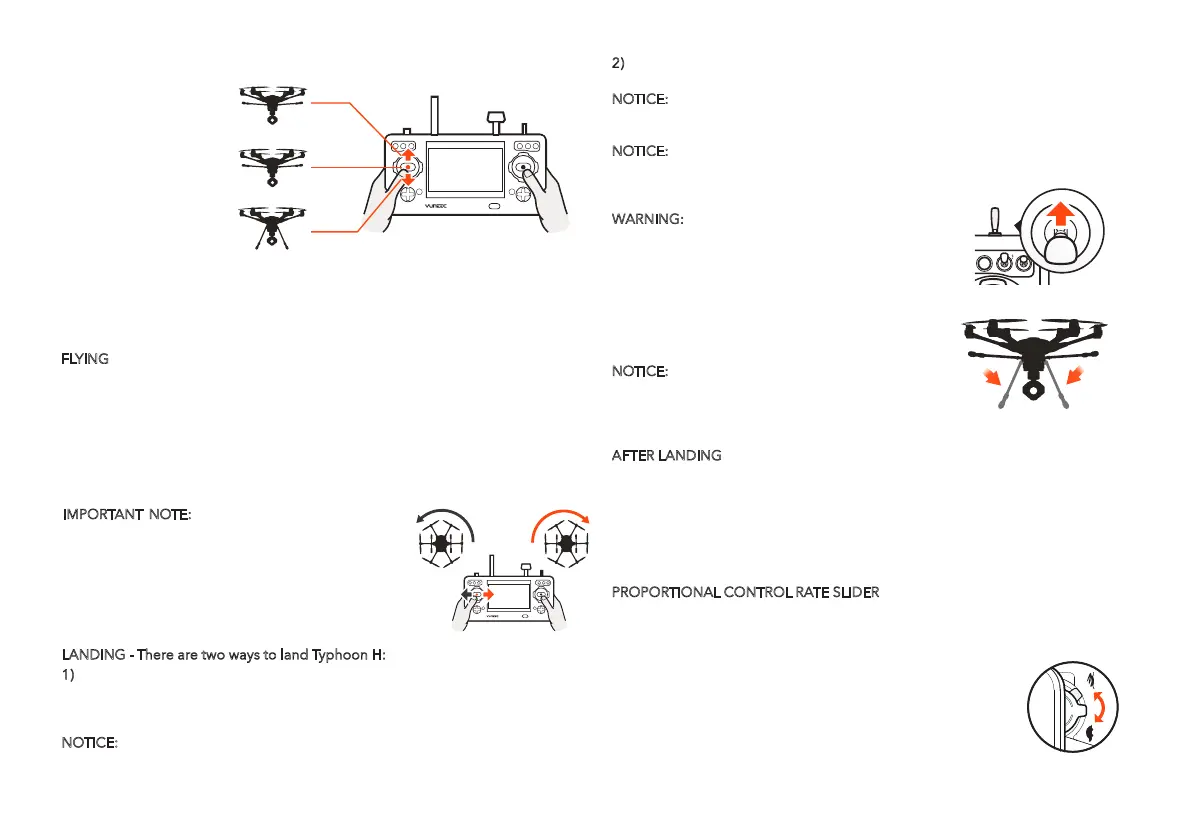
To take off, slowly raise the left-hand stick to above the center position. Typhoon H
will take off and climb slowly (or raise the stick further until it does). Allow the stick
to return to the center position when Typhoon H reaches the desired altitude.
FLYING
Take your time learning how Typhoon H responds to various control inputs while
flying. In Smart Mode, Typhoon H will always move in the direction the right-hand
control stick is pushed relative to the pilot and no matter which way the front/nose
is pointed.
In Angle (Pilot) Mode, Typhoon H will move in the direction the control stick is
pushed relative to the front/nose of the aircraft (and the ‘angle’ of movement is
determined by how far you push the stick away from the center position).
CLIMB MAX ALTITUDE
400 FEET / 122 METERS
MAINTAIN ALTITUDE
DESCEND / LAND
IMPORTANT NOTE: If at any time during flight you
feel like Typhoon H is drifting out of/beyond your
control, simply release both control sticks. Typhoon H
will automatically self-level and will even hold its
position (with a suitable GPS signal/lock) when both
control sticks are centered. You can also activate
Home Mode and Typhoon H will automatically fly
itself back to the home point and lands.
AFTER LANDING
ALWAYS turn off Typhoon H BEFORE turning off the ST16 Ground Station. Then
remove the battery from Typhoon H and allow it to cool to ambient/room tempera-
ture before recharging.
NOTICE: If the signal of the remote control is lost, Typhoon H will automatically
return to the home point and hold its position (with a suitable GPS signal/lock) over
the home position (except for low battery).
2)
Activate Home Mode and Typhoon H will automatically fly itself back to the
home point and land.
NOTICE:
After the copter takes off, the pilot can retract the landing gear by
switching up the Landing Gear Switch on the top right side of the ST16 Ground
Station. Make sure to flip the switch to the downward position when landing.
NOTICE:
During the landing phase of the RTH you can fine tune the landing
location. As the aircraft nears the ground refrain
from touching the direction controls as this can
cause the aircraft to tip over.
WARNING:
Always land as soon as possible after
the first low level voltage battery warning, or land
immediately after the second level low voltage
battery warning (as indicated by the vibrations
and audible alerts from the ST16 Ground Station,
and by the Motor LED Status Indicators flashing
rapidly). If at any time the Aircraft Battery Voltage
shown on the screen is below 14.1V, land Typhoon
H immediately.
TS01
TS02
TS03
TS04
00 : 35 : 25
D/R 0˚
System Setting Channel Setting Model Select
9
12.6V
FSK
WIFI
Roll 120˚
Pitch 0˚
300M
125km/h
TS05
TS06
TS07
TS08
GPS
VOL
FSK
WiFi
CHA
POS
CHA
POS
PROPORTIONAL CONTROL RATE SLIDER
The Proportional Control Rate Slider located on the right side of the ST16 Ground
Station allows you to set the overall climb/descend and directional control rates.
Use the turtle position for the lowest control rates (best for first-time pilots and
required when flying between 5000 feet and 8000 feet Above
Mean Sea Level), and use the rabbit position for the highest
control rates (best for experienced pilots and can only be used
when flying below 5000 feet MSL). Or use a position in
between if you prefer.
NOTICE: When the aircraft gives the first-level low
voltage warning, it will exit the TASK mode and
the functions under the TASK mode won't be
activated.
LANDING - There are two ways to land Typhoon H:
1) Position Typhoon H above the area where you would like to land. Slowly lower
the left-hand stick to below the center position. Typhoon H will descend slowly and
land. After Typhoon H lands, press and hold the START/STOP button until the
motor stops.
NOTICE:
It is recommended to turn off the Obstacle Avoidance when landing.


 To Next Page
 Loading...