USER INSTRUCTIONS
8
I
CLASSICO • MECHANICAL AUTOMATIC CHRONO MECHANICAL AUTOMATIC CHRONO • CLASSICO
I
9
• POSITION 1
NEUTRAL POSITION
• POSITION 2
FIRST CLICK
• POSITION 3
SECOND CLICK
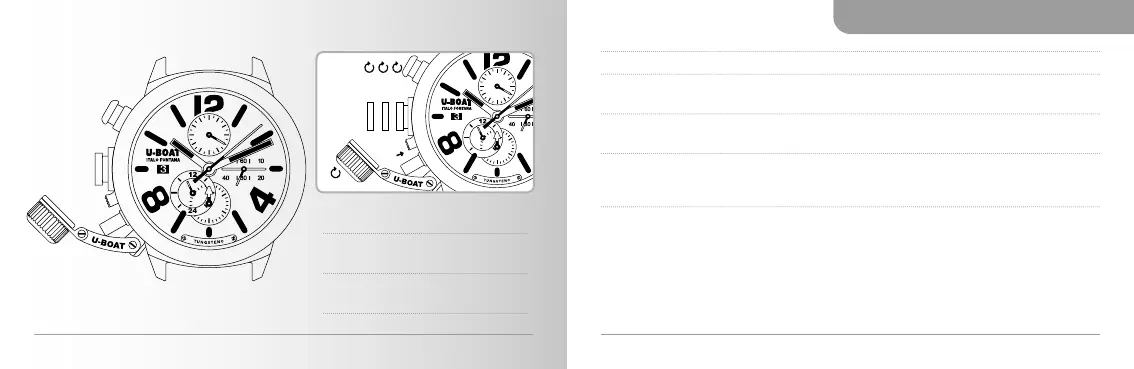
1. Unscrew the crown cover
●
A
to access the crown
●
C
.
POSITION 1
NEUTRAL POSITION
to wind up and start the watch, turn the crown
●
C
clockwise.
POSITION 2
FIRST CLICK
press the pusher
●
B
to bring the crown
●
C
to position 2. Turn the
crown
●
C
clockwise to set the desired date
●
O
.
POSITION 3
SECOND CLICK
press the pusher
●
B
again to bring the crown
●
C
to position 3.
Turn the crown ●
C
clockwise to set the desired time. Consider
the indicator
●
N
(24 hours) for the correct click of the date
●
O
.
2. Press the crown
●
C
all the way down to return it to position 1. Carefully screw
down the crown cover
●
A
until it locks completely.
●
B
●
B
●
O
●
N
●
N
●
O
POS. 3
POS. 2
POS. 1
●
A
●
C
●
A
●
C



 To Next Page