PAGE 2 OF 5 0614 IH-974
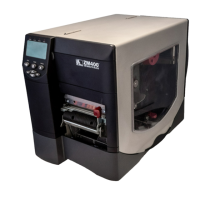
PRINTER MEDIA COMPARTMENT
NOTE: For optimal printing quality and proper printer performance, it is recommended to use genuine
Zebra™ supplies. Specifically, the ZM400 is designed to work only with genuine Zebra™ printheads, thus
maximizing safety and print quality.
CONTROL PANEL
The control panel contains the lights that indicate basic operation and the buttons that you may need to press
during basic operation.
1 Power Light On when the printer is on.
2 Pause Light On when the printer is paused.
3 Error Light Blinks or remains on when the printer needs attention.
4 Data Light Blinks quickly when the printer is receiving data.
5 LCD Shows the printer's operating status.
6
Pause Button Starts or stops printer operation when pressed.
Printhead Assembly
Control Panel
Media Door
Media Supply Guide
Media Supply Hanger
Ribbon Take-Up Spindle
Ribbon Supply Spindle
Dancer Assembly
Printhead Release Latch
1
2
3
4
5
6


 To Next Page
 Loading...