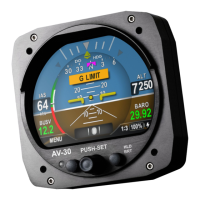
AV-30 Quick Reference Card
Course Deviation Indicator Mode
Basic Data
▪ Blank
▪ DG Heading
▪ Altitude
▪ Baro Set
▪ AoA
▪ Vertical Speed
▪ G Load
▪ Bus Volts
▪ Set Altitude
If Temp Probe
▪ OAT
▪ TAS
▪ DALT
If GPS Connected
▪ Waypoint ID
▪ Distance To
▪ Ground Speed
▪ Track
▪ XTE
▪ DTRK
▪ Bearing To
▪ Nav Mode
If AV-HSI Connected
▪ OBS
If Autopilot Connected
▪ Autopilot Mode
If BeaconX connected
▪ Squawk
If AV-Link+Sentry connected
▪ CO – Carbon Monoxide
UI Style
UI Font
Course Deviation
Glideslope
GPS Track Stabilization
HOURS
Push left button 2x
SETUP
ROT TO SEL
1 Not all values can be placed in
every field (Altitude and Baro
Setting only allowed in certain
fields). Some values are
implemented with graphical
indicators, other with textual
fields.
Push left button 1x
EDIT FIELDS
SEL FIELD
PUSH-SET Menu:
Push to cycle through options and rotate to change option
Close by cycling to end, pressing left button, or waiting 30
seconds
Options:
• OBS (with AV-HSI only)
• SRC SEL (with AV-HSI only)
Change Modes:
Long hold button changes mode to AI.
Select Current Page
Three Customizable Pages 1:2, 2:2, AI
AI - Decluttered Attitude Indicator/Transponder Control
Push RIGHT button to change page
Hold RIGHT button for brightness setting
Battery
State
FOR REFERENCE ONLY
EDIT FIELDS MENU
Highlighted In Black.
7 editable fields per page,
26 possible values
1
SETUP MENU
www.uavionix.com/support
Support: (844) 827
-2372
UAV-1005760-001 Rev E
Available
Only with
AV-HSI


 To Next Page
 Loading...


