EasyManua.ls Logo

UB+ dB1 DOUBLEBASS - User Manual

UB+ dB1 DOUBLEBASS
22 pages
Print Icon
To Next Page IconTo Next Page
Loading...
dB1
Ver/ 1.3
MODEL : M07
dB1 DOUBLEBASS
USER MANUAL
English
Question and Answer IconNeed help?

Do you have a question about the UB+ dB1 DOUBLEBASS and is the answer not in the manual?

Summary

Controls and Modes

Bluetooth Pairing Functionality

Explains how to activate and use Bluetooth pairing mode for device connection.

True Wireless Stereo (TWS) Pairing

Details the process for pairing two speakers for TWS functionality.

Matrix Multi-Speaker Pairing Mode

Guide for connecting multiple speakers for synchronized audio output.

USB Drive Music Playback Mode

Instructions for selecting and playing music files from a USB flash drive.

Basic Controls and Indicators

Power Button Operations

How to power on/off, connect to last used devices, and erase pairing via the power button.

Rotary Volume Control

Using the rotary knob to adjust volume levels on the speaker.

Speaker Indicator Status Guide

Explains the color and blinking patterns of the speaker's indicator light.

Bluetooth Connection Guide

Bluetooth Pairing Process

Step-by-step guide to connect your device to the speaker via Bluetooth.

TWS Stereo Pairing Process

TWS Pairing Mode

Instructions on how to pair two speakers for True Wireless Stereo sound.

Matrix Multi-Speaker Synchronization

Connecting Multiple Speakers

Guide to linking multiple speakers for synchronized playback using the Matrix function.

Matrix Connection Setup

Matrix Pairing Procedure

Detailed steps to establish a Matrix connection between speakers.

USB Drive Music Playback

USB Flash Drive Playback

How to play music from a USB flash drive using the USB Type C port.

USB Drive Playback Control

PLAY from Drive Mode

Selecting and controlling music playback from a USB drive.

Ports and Inputs

USB Type-C Power and Data Port

Details the USB Type-C port for charging and audio playback.

Auxiliary Audio Input Port

Information on the analog audio input port for wired connections.

Assembly Instructions

Leather Strap Assembly

Step-by-step guide on how to securely attach the leather carrying strap.

Tripod Stand Assembly

Instructions for assembling the multi-tier tripod stand for speaker placement.

Speaker Placement on Tripod

Docking the Speaker

Guidance on positioning and magnetically attaching the speaker to the tripod stand.

Safety and Regulatory Information

General Safety Precautions

Essential guidelines for safe operation, handling, and environment for the product.

FCC Interference Compliance

Information regarding FCC compliance and potential radio frequency interference.

EU Declaration of Conformity

Declaration of compliance with EU directives and relevant provisions.

Integrated Battery Safety

Battery Handling and Disposal

Guidelines for safe handling, potential hazards, and proper disposal of the lithium-ion battery.

Whats in the Box and Warranty

Package Contents

A list of all components provided in the product packaging.

Product Warranty Details

Details the product warranty period, coverage, and exclusions.

Speaker Placement Scenarios

Placement Options

Visual examples of speaker placement on a tabletop and various tripod stand configurations.

Summary

Controls and Modes

Bluetooth Pairing Functionality

Explains how to activate and use Bluetooth pairing mode for device connection.

True Wireless Stereo (TWS) Pairing

Details the process for pairing two speakers for TWS functionality.

Matrix Multi-Speaker Pairing Mode

Guide for connecting multiple speakers for synchronized audio output.

USB Drive Music Playback Mode

Instructions for selecting and playing music files from a USB flash drive.

Basic Controls and Indicators

Power Button Operations

How to power on/off, connect to last used devices, and erase pairing via the power button.

Rotary Volume Control

Using the rotary knob to adjust volume levels on the speaker.

Speaker Indicator Status Guide

Explains the color and blinking patterns of the speaker's indicator light.

Bluetooth Connection Guide

Bluetooth Pairing Process

Step-by-step guide to connect your device to the speaker via Bluetooth.

TWS Stereo Pairing Process

TWS Pairing Mode

Instructions on how to pair two speakers for True Wireless Stereo sound.

Matrix Multi-Speaker Synchronization

Connecting Multiple Speakers

Guide to linking multiple speakers for synchronized playback using the Matrix function.

Matrix Connection Setup

Matrix Pairing Procedure

Detailed steps to establish a Matrix connection between speakers.

USB Drive Music Playback

USB Flash Drive Playback

How to play music from a USB flash drive using the USB Type C port.

USB Drive Playback Control

PLAY from Drive Mode

Selecting and controlling music playback from a USB drive.

Ports and Inputs

USB Type-C Power and Data Port

Details the USB Type-C port for charging and audio playback.

Auxiliary Audio Input Port

Information on the analog audio input port for wired connections.

Assembly Instructions

Leather Strap Assembly

Step-by-step guide on how to securely attach the leather carrying strap.

Tripod Stand Assembly

Instructions for assembling the multi-tier tripod stand for speaker placement.

Speaker Placement on Tripod

Docking the Speaker

Guidance on positioning and magnetically attaching the speaker to the tripod stand.

Safety and Regulatory Information

General Safety Precautions

Essential guidelines for safe operation, handling, and environment for the product.

FCC Interference Compliance

Information regarding FCC compliance and potential radio frequency interference.

EU Declaration of Conformity

Declaration of compliance with EU directives and relevant provisions.

Integrated Battery Safety

Battery Handling and Disposal

Guidelines for safe handling, potential hazards, and proper disposal of the lithium-ion battery.

Whats in the Box and Warranty

Package Contents

A list of all components provided in the product packaging.

Product Warranty Details

Details the product warranty period, coverage, and exclusions.

Speaker Placement Scenarios

Placement Options

Visual examples of speaker placement on a tabletop and various tripod stand configurations.

Overview

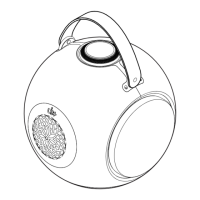
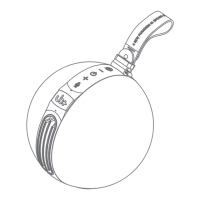
The UB+ dB1 DOUBLEBASS (Model: M07) is a portable speaker designed for wireless devices, combining traditional speaker design elements with modern audio technology. It features a distinctive spherical shape with a handle for portability and a control knob on the top surface.

Function Description:

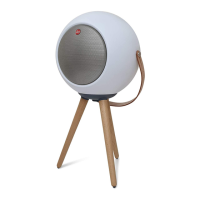
The dB1 DOUBLEBASS serves as a versatile audio speaker with multiple connectivity options and modes of operation. It supports Bluetooth pairing for wireless audio streaming, True Wireless Stereo (TWS) pairing for connecting two speakers for a stereo sound experience, and Matrix pairing for connecting multiple speakers (up to 8 with the UB+ SEEK App) for a wider soundstage. Additionally, it can play Hi-Res quality music directly from a USB Flash drive (TDRIVE mode) via its USB Type C port, which also functions for charging. The speaker is designed to be used in various positions, including on a tabletop or mounted on a modular three-tier tripod stand, which offers height adjustment.

Important Technical Specifications:

  • Model: M07
  • Connectivity: Bluetooth, True Wireless Stereo (TWS), Matrix (multiple speaker pairing), USB Type C (for TDRIVE and charging), Aux In.
  • Battery: Built-in Lithium ion/polymer rechargeable battery.
  • Charging Temperature: 10°C to 40°C (50°F to 104°F).
  • Wireless Frequency Band: 2400 to 2480 MHz.
  • Mounting: Magnetic base-plate for secure docking onto the tripod stand.
  • Materials: Anodize Aluminium tripod stand, Magnetic Aluminium base plate, Cow hide leather strap, Stainless steel strap holder.

Usage Features:

  • Control Knob: A central rotary button on the top surface acts as the primary control interface. Pressing it changes different modes (Bluetooth pairing, TWS pairing, Matrix pairing, PLAY from Drive), indicated by a light ring. The rotary knob also functions as a volume dial.
  • Power On/Off: Press the power button once to power on the speaker. Press once more to connect to the last used devices. Press and hold for 5 seconds for a full shutdown.
  • Volume Control: The rotary knob allows for volume adjustment.
  • Bluetooth Pairing: Press and hold the control knob for 2 seconds until the light ring starts blinking. A white light indicates successful pairing, accompanied by an indicative "connected" tone.
  • True Wireless Stereo (TWS) Pairing: Press and hold the control knob for 2 seconds. Turn the knob until the light ring displays the TWS logo for both speakers, indicating they are connected in stereo.
  • Matrix (Multiple Speaker) Pairing: Press and hold the control knob for 2 seconds until the light ring stops at the Matrix Connects logo. Clone speakers will sound an indicative "Matrix" tone when paired. The default factory setting supports AAC mode for TWS connect; for connecting up to 8 speakers, the UB+ SEEK App is required to swap Matrix connect function.
  • PLAY from Drive (TDRIVE) Mode: Press and hold the control knob for 2 seconds until the light ring stops at the "PLAY from Drive" logo. The speaker will sound an "USB Connected" tone. Press the control knob once (X1) to play/pause. Press the control knob twice (X2) simultaneously for the next song.
  • Erase All Pairing Devices: Press and hold the control knob for 2 seconds, then press the power button three times (X3) to erase all pairing devices.
  • Indicator Status:
    • White: Bluetooth connected.
    • Blinking White: Awaiting to connect Bluetooth.
    • Red: Charging battery.
    • Blinking Red: APP/updating firmware or Low battery (Battery level < 20%).
  • UB+ SEEK App: Available on iTunes and Play Store for firmware updates, new functionalities, and bug fixes, including enabling Matrix connect for up to 8 speakers.
  • Assembly: The device includes a leather strap that can be stretched and inserted into bullet belt holders for carrying. It also comes with a modular three-tier tripod stand. The J3 tier leg-joint can be screwed onto the magnetic base-plate for lower height adjustment.
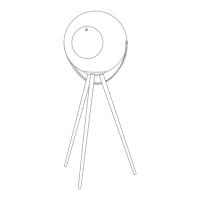
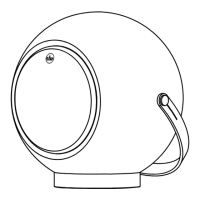
  • Placement: The speaker's magnetic base-plate attracts to the tripod stand for secure docking, indicated by a clicking sound. It can be placed on a tabletop or mounted on the 1-tier, 2-tier, or 3-tier tripod stand.

Maintenance Features:

  • Cleaning: Clean the product only with a soft, dry cloth.
  • Battery Care: Charge the built-in rechargeable battery regularly (about every 3 months) if not using the product for extended periods.
  • Firmware Updates: The UB+ SEEK App can be used to update speaker firmware.
  • Disposal: The Lithium ion/polymer battery should only be removed by an authorized recycling center. Dispose of used batteries according to local regulations.
  • Warranty: The appliance is guaranteed for 12 months from the date of purchase. Proof of purchase is required for service. The warranty does not cover failures due to accidents, damage, liquid ingress, negligence, misuse, or lack of maintenance.

Safety Instructions:

  • Keep the product dry and away from extreme temperatures (hairdryer, heater, direct sunlight).
  • Do not expose to water or moisture; if moisture-resistant, do not immerse or expose to rain.
  • Do not dismantle or attempt to repair the product.
  • Do not pierce, crush, or set fire to the product.
  • Keep product, accessories, and packaging out of reach of children and pets.
  • In case of smoke, abnormal sound, or smell, disconnect DC power immediately.
  • Use only standard USB ports certified according to IEC60950-1 (LPS) or IEC62368-1 (PS2).
  • Pay attention to cables to prevent stumbling.
  • Hanging speakers should not exceed 2 meters in height, and mounting parts must withstand 4 times the equipment's weight.
  • Handle waste according to local regulations.
  • Do not dispose of batteries in high temperatures, water, or acidic environments due to explosion hazards.
  • Wireless device signals may impair other electronic and medical devices; switch off where prohibited (medical facilities, aircraft, refueling points, automatic doors, fire alarms).
  • Keep at least 20 cm from pacemakers and other medical devices.
  • Use only attachments/accessories/spare parts supplied or recommended by UB+.
  • Changes or modifications not expressly approved by TGI Technology Pte Limited could void the user's warranty.
  • For Europe CE compliance, the device must be installed with CE certified computer equipment (Class B limits), and all cables must be shielded, grounded, and no longer than 3m.


UB+ dB1 DOUBLEBASS Specifications

General IconGeneral
BrandUB+
ModeldB1 DOUBLEBASS
CategorySpeakers
LanguageEnglish

Related product manuals