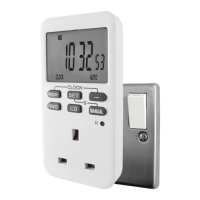
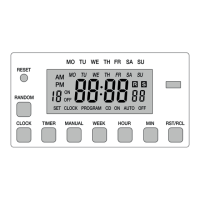
Operating modes
Press the MANUAL button to select one of the three operating modes:
1. ON (displayed on the bottom right of the screen) - the timer will be constantly ON.
2. AUTO (displayed on the bottom right of the screen) - the timer will follow your programmed times.
3. OFF (displayed on the bottom right of the screen) - the timer will be switched OFF.
Random function
The timer will randomly turn ON for between 10 and 31 minutes between the hours of 18:00 and 06:00.
1. Press the RND button, an R will appear within a black box on the right side of the screen.
N.B. The random function will overide any of your programmed times, to turn off press the RND button (the R will disappear on the screen).
Countdown timer
1. Press the - button.
2. Press the SET button. SET and OFF will ash on the bottom of the screen.
3. Press the PROG/+ button to select ON or OFF (displayed on the bottom right of the screen):
ON - the timer will be ON during the countdown period and turn OFF when completed.
OFF - the timer will be OFF during the countdown period and turn ON when completed.
4. Press the SET button.
5. Press the PROG/+ and - buttons to select the hours (0 to 99). Press the SET button.
6. Press the PROG/+ and - buttons to select the minutes (0 to 59). Press the SET button.
7. Press the PROG/+ and - buttons to select the seconds (0 to 59). Press the SET button.
8. Press the CD button to begin the countdown timer.
N.B. The countdown timer will overide any of your programmed times, to stop the countdown timer early press the CD button.
Specication
230V AC 50Hz
Max load: 13A
2A inductive
1.2V Ni-MH rechargeable battery
Safety warning
This product is not a toy. Do not plug in multi plug adaptors / extensions leads. Do not use with immersion heaters, over 500W lament or discharge type lighting. Not suitable for commercial use. For indoor
use only (operating temp: 0ºC to 35ºC). Do not plug in an appliance where the load exceeds 13 Amp. Always ensure the plug of any appliance is fully inserted into the timer. If cleaning of the timer is required,
remove from the mains power and wipe timer with a dry cloth. Do not immerse in water or any other liquid. Do not connect the timer to a device performing a mechanical function. Failure to follow these safety
instructions could result in re, electric shock, injury or damage to persons, product or property and will
invalidate the guarantee.
Batteries
This product is tted with a 1.2V Ni-MH rechargeable battery. It should be removed prior to disposal.
Help the environment by disposing of your products and batteries responsibly.
Guarantee
This product is guaranteed for one year from the date of purchase against faulty parts or workmanship.
It does not cover physical damage to the unit. Proof of purchase required. This does not affect your statutory rights.
Uni-Com (Global) Ltd.
1 & 2 Enterprise Way,
Edenbridge, Kent, TN8 6EW
+44 (0)1732 865238
info@uni-com.co.uk
www.uni-com.co.uk
Reset
1. Press the R button with a pencil to clear all the information and programmes stored on the timer.
LED indicator
A red LED will illuminate at the top of the timer (above the screen) to show when the timer is on (operating the appliance/device plugged into it).
Made in China
V2


 To Previous Page
 Loading...