12
Tone Alert and Ring Tone Amplifier
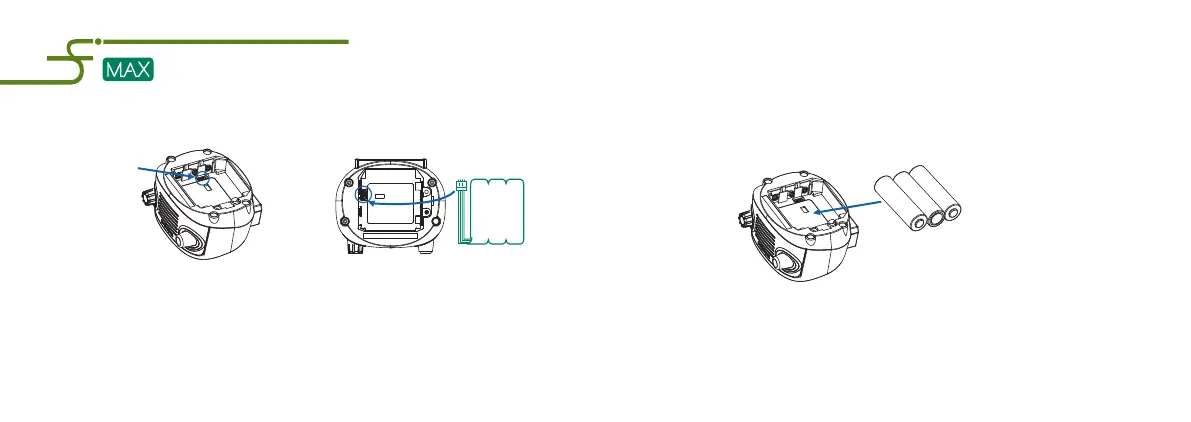
Step1: Remove the retaining screws in the battery door and then lift off the battery compartment cover.
Step2: Then simply insert the pin connector from Battery Pack into the mating connector inside
the battery compartment of the Uni MAX unit.
Step3: Reinstall the battery cover and screws, and then plug the wall transformer in to an AC receptacle
if needed. After the batteries are inserted, the GREEN Power LED will automatically light.
NOTE:
To avoid the risk of electrical shock, DO NOT alter the charging or use batteries other than
the battery pack intended for this unit.
Socket
Step3: Reinstall the battery cover and screws. After the batteries are inserted,
the GREEN Power LED will automatically light and flash.
NOTE:
For proper operation, please unplug the wall transformer before using the alkaline batteries.
13
3. Installing the Alkaline Batteries
You can use 3 standard AA alkaline batteries To power the device.
Step1: Remove the retaining screws in the battery door and then lift off the battery
compartment cover.
Step2: Observing the correct polarities, insert the AA batteries into
the Uni MAX battery compartment as shown below.


 To Next Page
 Loading...